> For the complete documentation index, see [llms.txt](https://support.backpack.exchange/llms.txt). Markdown versions of documentation pages are available by appending `.md` to page URLs; this page is available as [Markdown](https://support.backpack.exchange/support-docs/vn/vi-wallet/cac-hoat-dong/vi-da-tai-khoan.md).
# Ví Đa Tài Khoản
#### Tổng Quan Tính Năng
Ví Đa Tài Khoản cho phép bạn:
* Tạo các nhóm ví riêng biệt
* Duy trì ranh giới nhận diện rõ ràng hơn
* Sắp xếp ví theo mục đích sử dụng hoặc quyền sở hữu
Điều này bảo đảm việc quản lý tài sản được cải thiện, tăng cường bảo mật và mang lại trải nghiệm ví có cấu trúc rõ ràng hơn.
***
#### Thiết Lập Đa Tài Khoản Trên Thiết Bị Di Động
Thực hiện theo các bước dưới đây để cấu hình và quản lý nhiều tài khoản ví trên ứng dụng Backpack dành cho thiết bị di động.
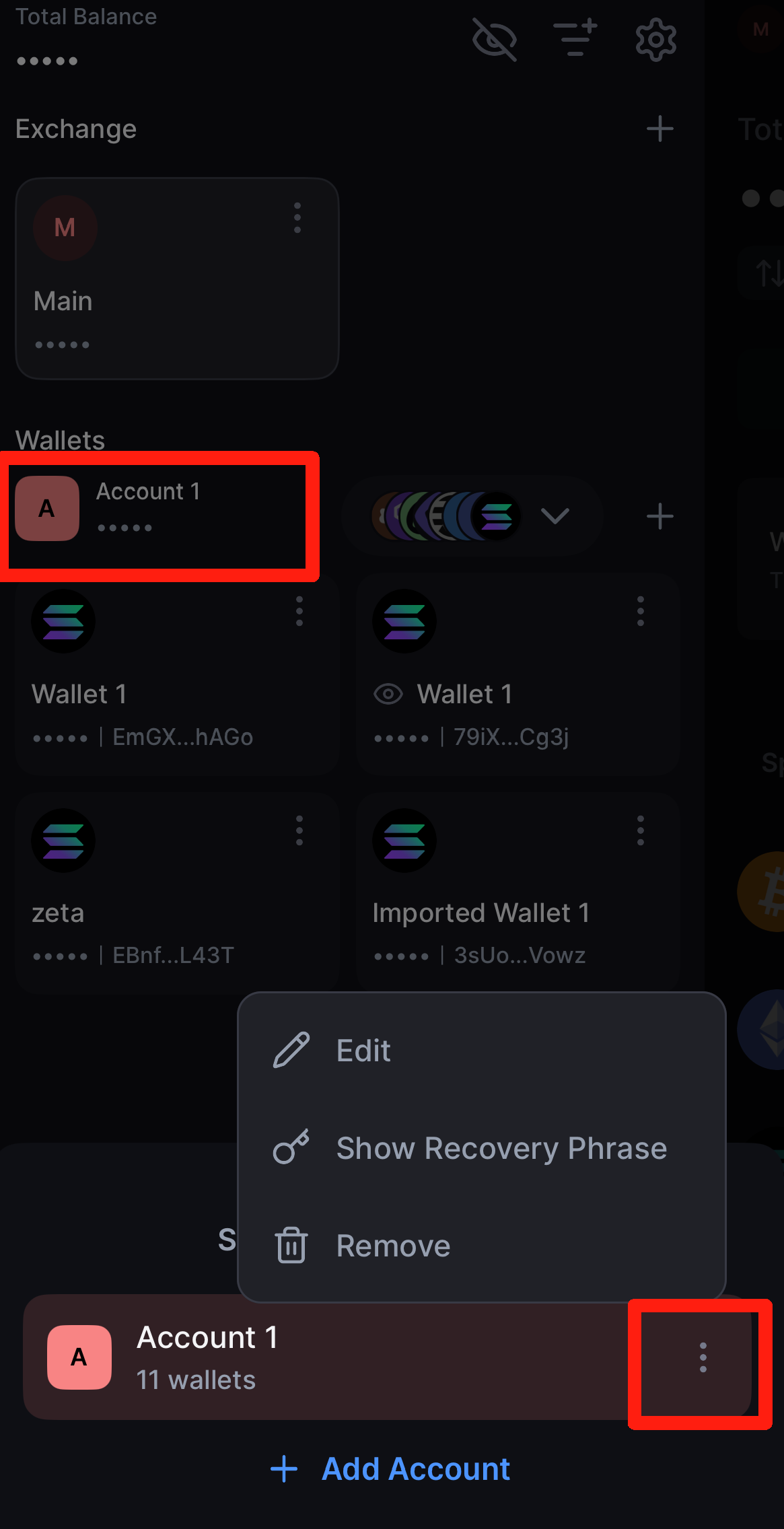
**1. Quản Lý Một Nhóm Hiện Có**
* Điều hướng đến màn hình **Wallet Management**.
* Trong mục **Wallets**, nhấn vào **Account 1** (hoặc nhóm bạn muốn quản lý).
* Nhấn vào biểu tượng **ba dấu chấm** nằm ở góc dưới bên phải.
* Tại đây, bạn có thể:
* **Chỉnh sửa tên tài khoản**
* **Xóa tài khoản** khỏi danh sách
***
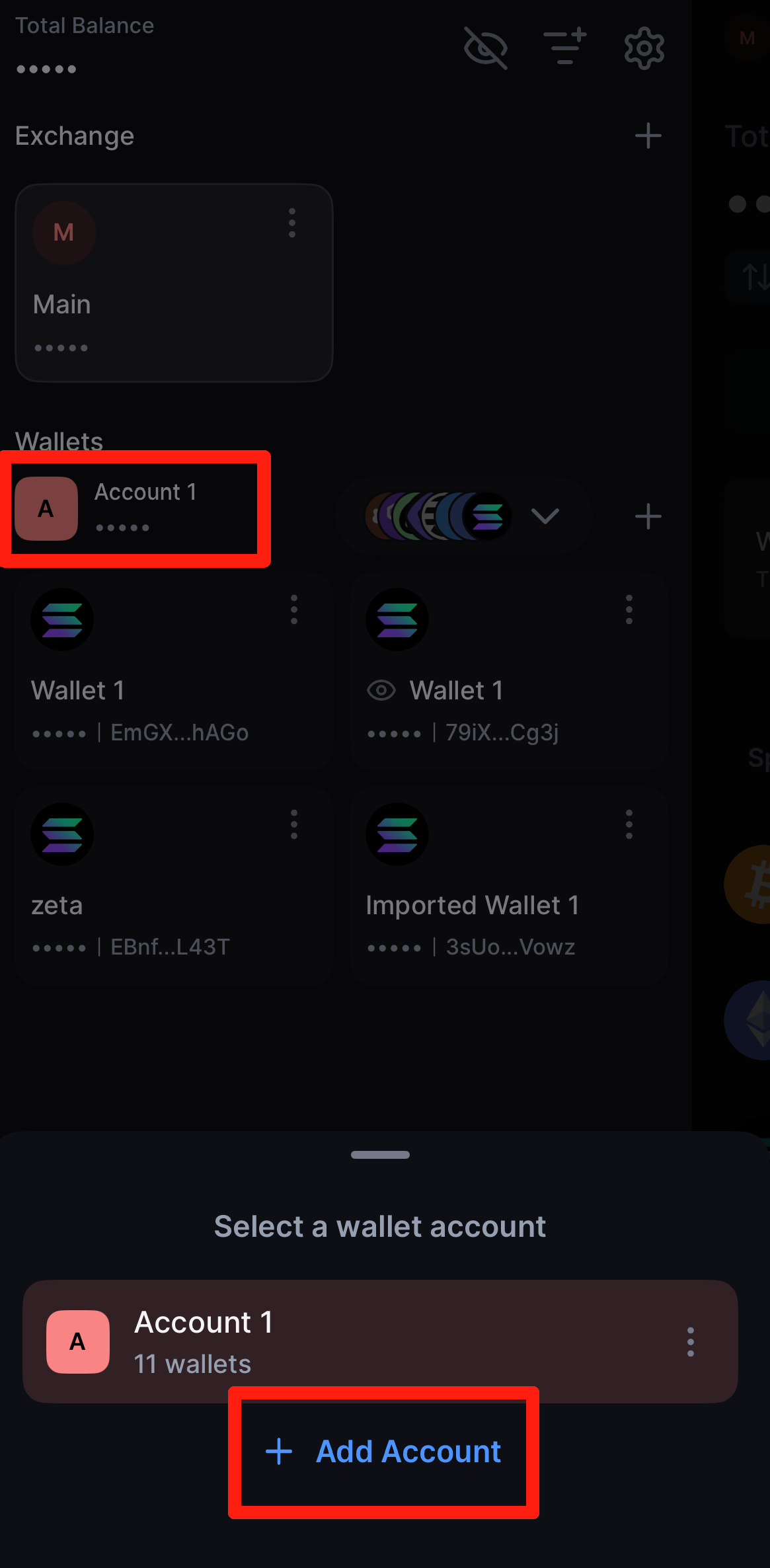
**2. Thêm Nhóm Mới**
* Điều hướng đến màn hình **Wallet Management**.
* Trong mục **Wallets**, nhấn vào **Account 1** (hoặc bất kỳ nhóm hiện có nào).
* Chọn **Add Account**.
* Nhập **tên** cho tài khoản mới.
* Chọn một trong các tùy chọn sau:
* [**Import an existing wallet**](https://support.backpack.exchange/wallet/get-started/import-recover-wallet) bằng seed phrase hoặc private key
* **Create a new wallet** với seed phrase mới
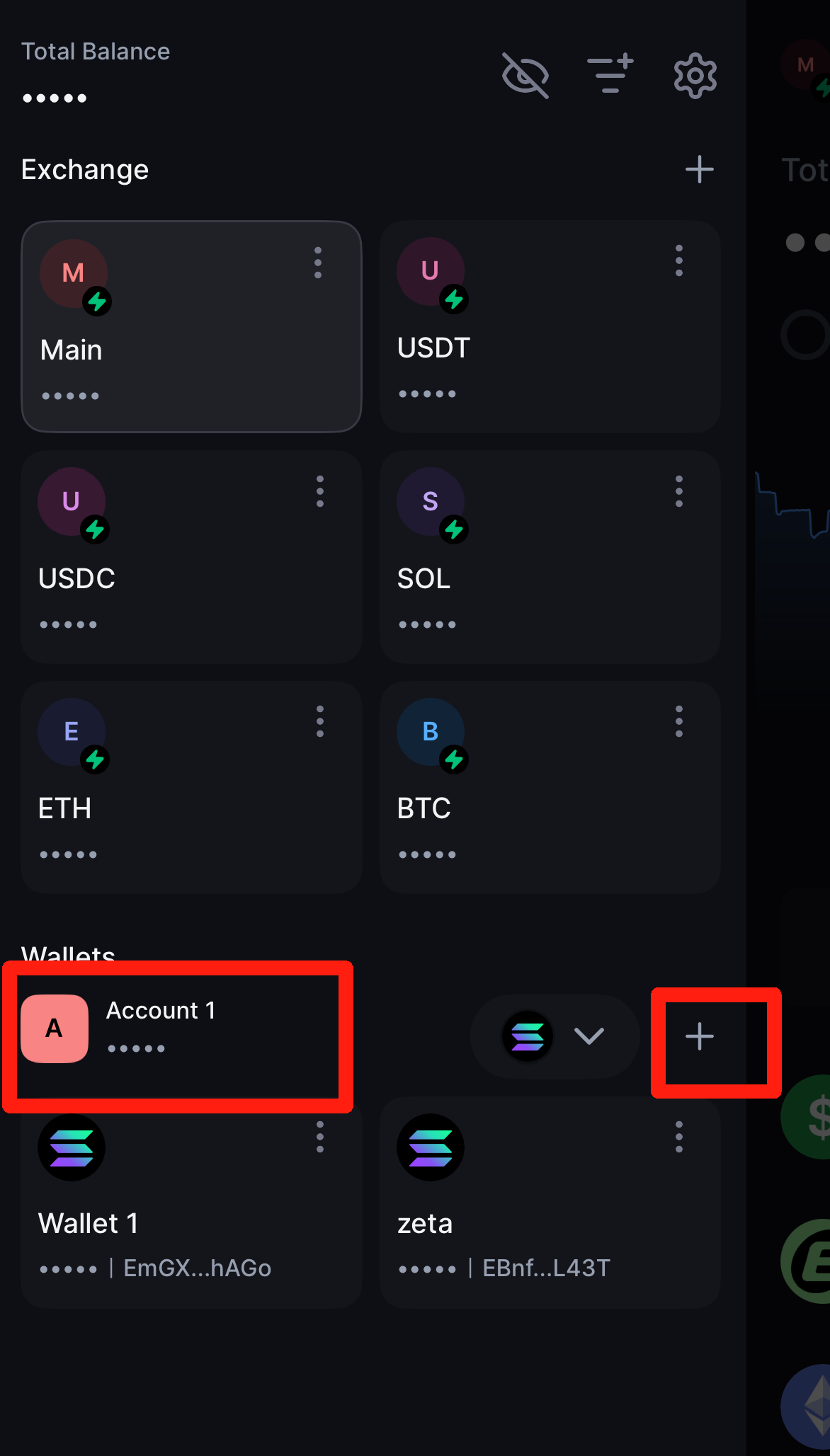
#### 3. Thêm Ví Mới Trong Một Nhóm
1. Tại màn hình **Wallet Management**, tìm **Account 1** (hoặc nhóm bạn muốn quản lý) trong mục *Wallets*.
2. Nhấn vào biểu tượng **dấu cộng (+)** bên cạnh tài khoản.
3. Chọn **mạng blockchain** bạn muốn sử dụng.
4. Chọn một trong các tùy chọn sau:
* [**Import an existing wallet**](https://support.backpack.exchange/wallet/get-started/import-recover-wallet) trên mạng đó
* **Create a new wallet** trong cùng nhóm
***
#### Ví Dụ Trường Hợp Sử Dụng
Bạn có thể tạo các nhóm tài khoản khác nhau cho nhiều mục đích khác nhau, chẳng hạn như:
* **Personal Wallets** - dùng cho giao dịch cá nhân và quản lý tài sản
* **Corporate Wallets** - dùng cho nguồn vốn thuộc sở hữu công ty hoặc mục đích vận hành
* [**Multisig Wallets**](https://support.backpack.exchange/wallet/actions/multisig) - yêu cầu nhiều phê duyệt cho giao dịch
Cấu trúc này tăng cường tính rõ ràng, giúp phân tách trách nhiệm và cải thiện hiệu quả quy trình làm việc khi bạn quản lý nhiều loại tài sản khác nhau.
---
# Agent Instructions
This documentation is published with GitBook. GitBook is the documentation platform designed so that both humans and AI agents can read, navigate, and reason over technical content effectively. Learn more at gitbook.com.
## Querying This Documentation
If you need additional information that is not directly available in this page, you can query the documentation by asking a question.
Perform an HTTP GET request on the following URL with the `ask` and `goal` query parameters:
```
GET https://support.backpack.exchange/support-docs/vn/vi-wallet/cac-hoat-dong/vi-da-tai-khoan.md?ask=&goal=
```
`ask` is the immediate question: it should be specific, self-contained, and written in natural language.
`goal` is what the user is ultimately trying to achieve, the reason they need the answer. Sharing it helps GitBook give you a better, more relevant answer. A goal is most helpful when it describes the outcome the user wants rather than restating the question. For example, with `ask=how do I create an API token`, a goal like `automate deployments from our CI pipeline` lets GitBook tailor the answer to that use case.
The response will contain a direct answer to the question and relevant excerpts and sources from the documentation.
Use this mechanism when the answer is not explicitly present in the current page, you need clarification or additional context, or you want to retrieve related documentation sections.