> For the complete documentation index, see [llms.txt](https://support.backpack.exchange/llms.txt). Markdown versions of documentation pages are available by appending `.md` to page URLs; this page is available as [Markdown](https://support.backpack.exchange/support-docs/ru/koshelyok/ustranenie-nepoladok/skryt-tokeny.md).
# Скрыть токены
{% hint style="info" %}
Этот документ переведён с помощью машинного перевода и может содержать неточности. В случае расхождений руководствуйтесь [английской версией](https://support.backpack.exchange/).
{% endhint %}
Используйте **Hidden Tokens**, чтобы управлять отображением токенов в Backpack Wallet. Скрытие токена удаляет его только из отображения баланса кошелька.
### Расширение браузера
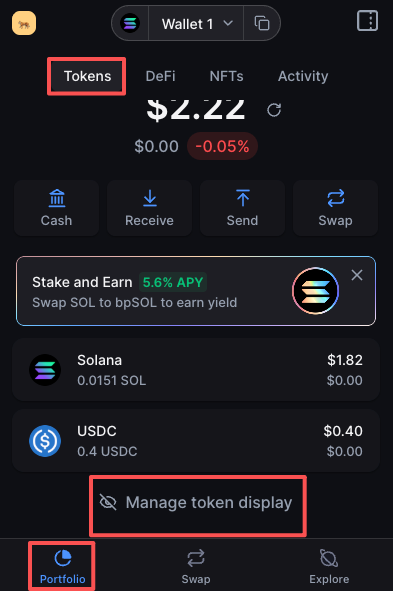
1. Откройте **Portfolio**, выберите вкладку **Tokens**, затем выберите **Manage hidden tokens**.
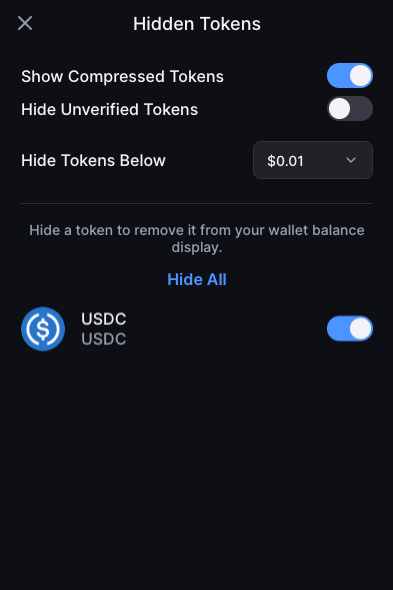
2. На странице **Hidden Tokens** настройте отображение токенов.
### Мобильное приложение
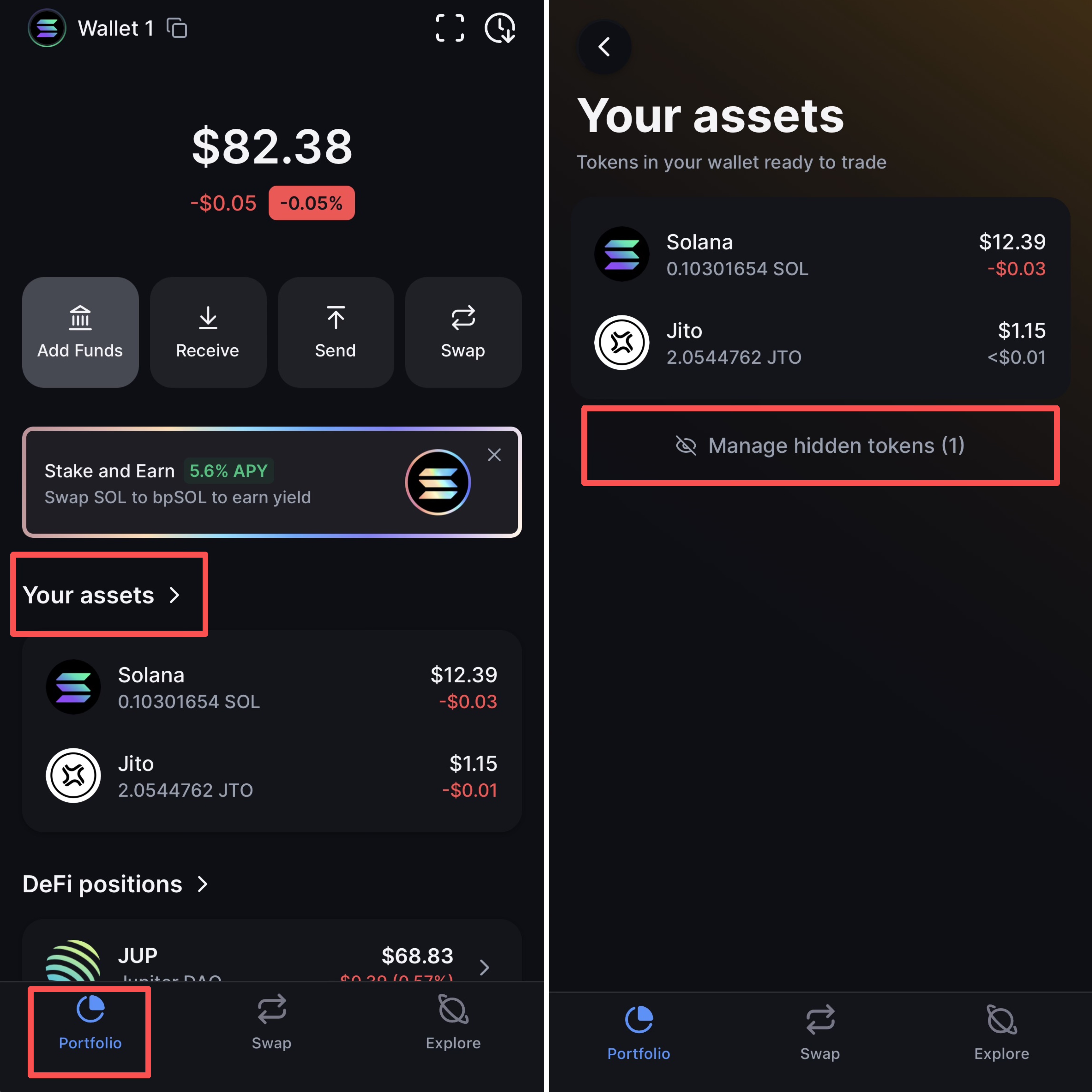
1. Откройте **Portfolio**, затем выберите **Your assets**.
2. Выберите **Manage hidden tokens**, затем настройте отображение на странице **Hidden Tokens**.
### Настройки скрытых токенов
На странице **Hidden Tokens** можно:
* **Show Compressed Tokens:** выбрать, отображать ли сжатые токены.
* **Hide Unverified Tokens:** скрыть непроверенные токены.
* **Hide Tokens Below:** установить порог стоимости для скрытия токенов.
* **Hide All:** скрыть все токены на этой странице.
* **Отдельные токены:** используйте переключатель рядом с токеном, чтобы показать или скрыть его.
> **Примечание:** Скрытие токена удаляет его только из отображения баланса. Сам токен из кошелька не удаляется.
---
# Agent Instructions
This documentation is published with GitBook. GitBook is the documentation platform designed so that both humans and AI agents can read, navigate, and reason over technical content effectively. Learn more at gitbook.com.
## Querying This Documentation
If you need additional information that is not directly available in this page, you can query the documentation by asking a question.
Perform an HTTP GET request on the following URL with the `ask` and `goal` query parameters:
```
GET https://support.backpack.exchange/support-docs/ru/koshelyok/ustranenie-nepoladok/skryt-tokeny.md?ask=&goal=
```
`ask` is the immediate question: it should be specific, self-contained, and written in natural language.
`goal` is what the user is ultimately trying to achieve, the reason they need the answer. Sharing it helps GitBook give you a better, more relevant answer. A goal is most helpful when it describes the outcome the user wants rather than restating the question. For example, with `ask=how do I create an API token`, a goal like `automate deployments from our CI pipeline` lets GitBook tailor the answer to that use case.
The response will contain a direct answer to the question and relevant excerpts and sources from the documentation.
Use this mechanism when the answer is not explicitly present in the current page, you need clarification or additional context, or you want to retrieve related documentation sections.