> For the complete documentation index, see [llms.txt](https://support.backpack.exchange/llms.txt). Markdown versions of documentation pages are available by appending `.md` to page URLs; this page is available as [Markdown](https://support.backpack.exchange/support-docs/ru/birzha/depozit-i-vyvod/kriptovalyuta/depozit/kak-sdelat-depozit.md).
# Как сделать депозит?
{% hint style="info" %}
Этот документ переведён с помощью машинного перевода и может содержать неточности. В случае расхождений руководствуйтесь [английской версией](https://support.backpack.exchange/).
{% endhint %}
#### Распространенные активы для депозита и поддерживаемые сети
| Актив | Поддерживаемые сети для депозита |
| -------- | ------------------------------------------------------------------------ |
| **USDC** | Solana, Ethereum, SUI, Arbitrum, Base, Optimism, Polygon, Sei EVM, Aptos |
| **USDT** | Solana, Ethereum, Tron |
| **BTC** | Bitcoin, Solana (Coinbase BTC) |
| **ETH** | Ethereum, Arbitrum, Base, Optimism |
| **SOL** | Solana |
### :warning:**Важные примечания**
### 1. Поддерживаемые депозиты стейблкоинов
Backpack Exchange поддерживает только **депозиты нативных стейблкоинов** в соответствующих сетях.\
Депозит неправильной версии стейблкоина может привести к тому, что ваши средства не будут зачислены.
#### Пример: сеть Optimism
В сети Optimism Backpack поддерживает только депозиты **USDT0** с адресом контракта:
{% code collapsedlinecount="10" %}
```
0x01bFF41798a0BcF287b996046Ca68b395DbC1071
```
{% endcode %}
Мы **не** поддерживаем депозиты USDT с адресом контракта:
{% code collapsedlinecount="10" %}
```
0x94b008aA00579c1307B0EF2c499aD98a8ce58e58
```
{% endcode %}
{% hint style="danger" %}
Если вы внесете USDT (а не USDT0) в сети Optimism, средства не будут зачислены на ваш аккаунт Backpack.
{% endhint %}
{% hint style="info" %}
**Примечание:** Backpack Exchange в настоящее время поддерживает только нативный USDC в каждой поддерживаемой сети. Бриджевые или обернутые версии USDC (например, USDC.e) не поддерживаются. Депозит таких версий может привести к потере средств или длительному процессу восстановления, если восстановление возможно.
{% endhint %}
### 2. Как избежать ошибок при депозите
Перед отправкой перевода:
1. **Внимательно проверьте** адрес депозита и сеть
2. **Прочитайте** все уведомления и предупреждения на странице депозита
3. **Свяжитесь** с нашей официальной службой поддержки, если вы не уверены, какую сеть или токен использовать
{% hint style="info" %}
**Неправильные депозиты могут привести к:**
* ⚠️ Безвозвратной потере средств, или
* ⏳ Длительному процессу возврата (если восстановление возможно)
{% endhint %}
***
### Депозит на адрес кошелька биржи
#### 1. Откройте меню Deposit
{% hint style="info" %}
Если вы делаете депозит с мобильного устройства, просто нажмите кнопку **Deposit** на странице **Home** или **Portfolio**.
{% endhint %}
#### 2. Выберите криптовалюту, которую хотите внести
Если вы не видите токен в списке, воспользуйтесь поиском.
#### 3. Скопируйте адрес кошелька
#### 4. Вставьте адрес на платформе, с которой отправляете средства, и инициируйте перевод (с некастодиального кошелька или биржи)
***
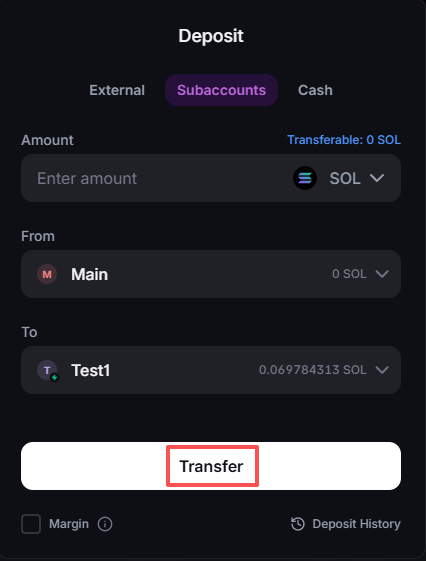
### Депозит через субаккаунты
#### 1. Откройте меню Deposit
{% hint style="info" %}
Если вы делаете депозит с мобильного устройства, просто нажмите кнопку **Deposit** на странице **Home** или **Portfolio**.
{% endhint %}
#### 2. Выберите криптовалюту, которую хотите внести
#### 3. Введите сумму депозита и **выберите субаккаунт 'From' и субаккаунт 'To'.**
#### 4. Нажмите кнопку 'Transfer'.
---
# Agent Instructions
This documentation is published with GitBook. GitBook is the documentation platform designed so that both humans and AI agents can read, navigate, and reason over technical content effectively. Learn more at gitbook.com.
## Querying This Documentation
If you need additional information that is not directly available in this page, you can query the documentation by asking a question.
Perform an HTTP GET request on the following URL with the `ask` and `goal` query parameters:
```
GET https://support.backpack.exchange/support-docs/ru/birzha/depozit-i-vyvod/kriptovalyuta/depozit/kak-sdelat-depozit.md?ask=&goal=
```
`ask` is the immediate question: it should be specific, self-contained, and written in natural language.
`goal` is what the user is ultimately trying to achieve, the reason they need the answer. Sharing it helps GitBook give you a better, more relevant answer. A goal is most helpful when it describes the outcome the user wants rather than restating the question. For example, with `ask=how do I create an API token`, a goal like `automate deployments from our CI pipeline` lets GitBook tailor the answer to that use case.
The response will contain a direct answer to the question and relevant excerpts and sources from the documentation.
Use this mechanism when the answer is not explicitly present in the current page, you need clarification or additional context, or you want to retrieve related documentation sections.