> For the complete documentation index, see [llms.txt](https://support.backpack.exchange/llms.txt). Markdown versions of documentation pages are available by appending `.md` to page URLs; this page is available as [Markdown](https://support.backpack.exchange/support-docs/ru/birzha/bezopasnost/ya-podozrevayu-chto-moi-akkaunt-vzlomali.md).
# Я подозреваю, что мой аккаунт взломали
{% hint style="info" %}
Этот документ переведён с помощью машинного перевода и может содержать неточности. В случае расхождений руководствуйтесь [английской версией](https://support.backpack.exchange/).
{% endhint %}
### Что делать
{% stepper %}
{% step %}
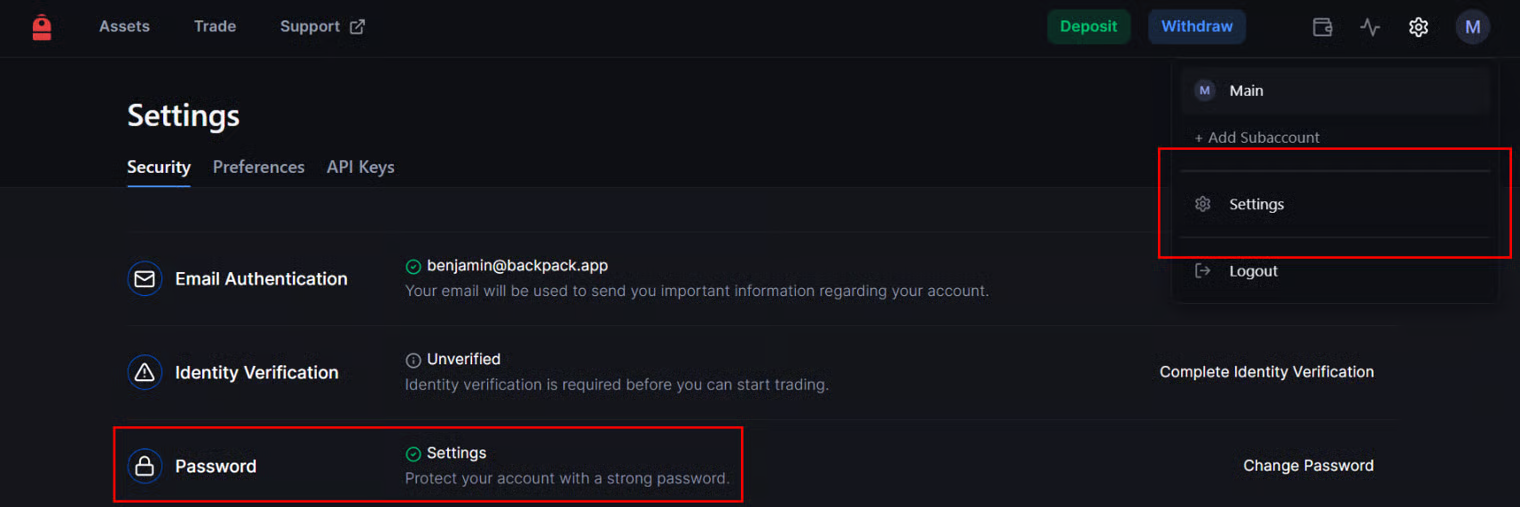
### Немедленно измените ваш пароль
* Войдите в систему и перейдите в **Settings**.
* Обновите ваш пароль, используя надежную, уникальную комбинацию.
* Посетите [Backpack Exchange](https://backpack.exchange/settings/security).
{% endstep %}
{% step %}
### Включите двухфакторную аутентификацию (2FA)
* Если она не активна, перейдите в **Security Settings**.
* Настройте 2FA, используя надежное приложение, такое как Google Authenticator.
{% endstep %}
{% step %}
#### Проверьте привязанные аккаунты
* Перейдите в **Settings** > **Security** > **Connected accounts**.
* Отключите любой аккаунт Google или Apple, который вам неизвестен. См. [Привязка и отключение Google или Apple](/support-docs/ru/birzha/bezopasnost/vkhod-cherez-google-i-apple/privyazka-i-otklyuchenie-google-ili-apple.md).
{% endstep %}
{% step %}
### Просмотрите активность аккаунта
* Проверьте вашу историю транзакций на наличие незнакомых действий или транзакций.
* Свяжитесь с нами по адресу **** с подробностями ваших опасений.
* Укажите любую необычную активность, которую вы заметили.
{% endstep %}
{% endstepper %}
***
### Распознавание и избежание попыток фишинга
Чтобы защитить ваш аккаунт Backpack Exchange, крайне важно распознавать и предотвращать попытки фишинга. Следуйте этим шагам:
{% stepper %}
{% step %}
### Проверяйте URL
* Всегда убеждайтесь, что вы заходите на официальный сайт: [https://backpack.exchange](https://backpack.exchange/).
* Дважды проверьте URL перед вводом каких-либо учетных данных.
* *Примечание:* [*Официальные ссылки на все каналы Backpack Exchange и Backpack Wallet находятся здесь.*](https://backpack.app/)
{% endstep %}
{% step %}
### Остерегайтесь незапрошенных сообщений
* Будьте осторожны с подозрительными письмами или сообщениями, утверждающими, что они от Backpack Exchange.
* Мы **никогда** не попросим ваш пароль или коды 2FA.
* Если кто-то просит их, это мошенник.
{% endstep %}
{% step %}
### Изучайте отправителей писем
* Дважды проверьте адрес электронной почты отправителя.
* Фишеры могут использовать адреса, которые выглядят похожими, но с небольшими изменениями.
{% endstep %}
{% step %}
### Избегайте нажатия на подозрительные ссылки
* Не нажимайте на ссылки и не загружайте вложения из неизвестных источников.
* Наведите курсор на ссылки, чтобы предварительно просмотреть URL назначения перед нажатием.
{% endstep %}
{% step %}
### Сообщайте о подозрительной активности
* Если вы столкнулись с чем-то подозрительным, связанным с Backpack Exchange, немедленно свяжитесь с ****.
{% endstep %}
{% endstepper %}
{% hint style="info" %}
**🔒 Напоминание**
Ваша онлайн-безопасность жизненно важна. Оставаясь информированным и осторожным, вы можете защитить свой аккаунт и активы от потенциальных угроз.
{% endhint %}
---
# Agent Instructions
This documentation is published with GitBook. GitBook is the documentation platform designed so that both humans and AI agents can read, navigate, and reason over technical content effectively. Learn more at gitbook.com.
## Querying This Documentation
If you need additional information that is not directly available in this page, you can query the documentation by asking a question.
Perform an HTTP GET request on the following URL with the `ask` and `goal` query parameters:
```
GET https://support.backpack.exchange/support-docs/ru/birzha/bezopasnost/ya-podozrevayu-chto-moi-akkaunt-vzlomali.md?ask=&goal=
```
`ask` is the immediate question: it should be specific, self-contained, and written in natural language.
`goal` is what the user is ultimately trying to achieve, the reason they need the answer. Sharing it helps GitBook give you a better, more relevant answer. A goal is most helpful when it describes the outcome the user wants rather than restating the question. For example, with `ask=how do I create an API token`, a goal like `automate deployments from our CI pipeline` lets GitBook tailor the answer to that use case.
The response will contain a direct answer to the question and relevant excerpts and sources from the documentation.
Use this mechanism when the answer is not explicitly present in the current page, you need clarification or additional context, or you want to retrieve related documentation sections.