> For the complete documentation index, see [llms.txt](https://support.backpack.exchange/llms.txt). Markdown versions of documentation pages are available by appending `.md` to page URLs; this page is available as [Markdown](https://support.backpack.exchange/support-docs/ru/birzha/akkaunt-birzhi/sozdanie-novogo-akkaunta/sozdanie-akkaunta-v-prilozhenii.md).
# Создание аккаунта в приложении
{% hint style="info" %}
Этот документ переведён с помощью машинного перевода и может содержать неточности. В случае расхождений руководствуйтесь [английской версией](https://support.backpack.exchange/).
{% endhint %}
Прежде чем начать торговать на Backpack Exchange, вам нужно зарегистрироваться. Создание учетной записи на Backpack Exchange простое и понятное.
### Скачать мобильное приложение Backpack
* [iOS App Store](https://apps.apple.com/us/app/backpack-wallet-exchange/id6445964121)
* [Google Play](https://play.google.com/store/search?q=backpack+wallet+and+exchange\&c=apps\&hl=en_US)
### Выберите способ создания аккаунта
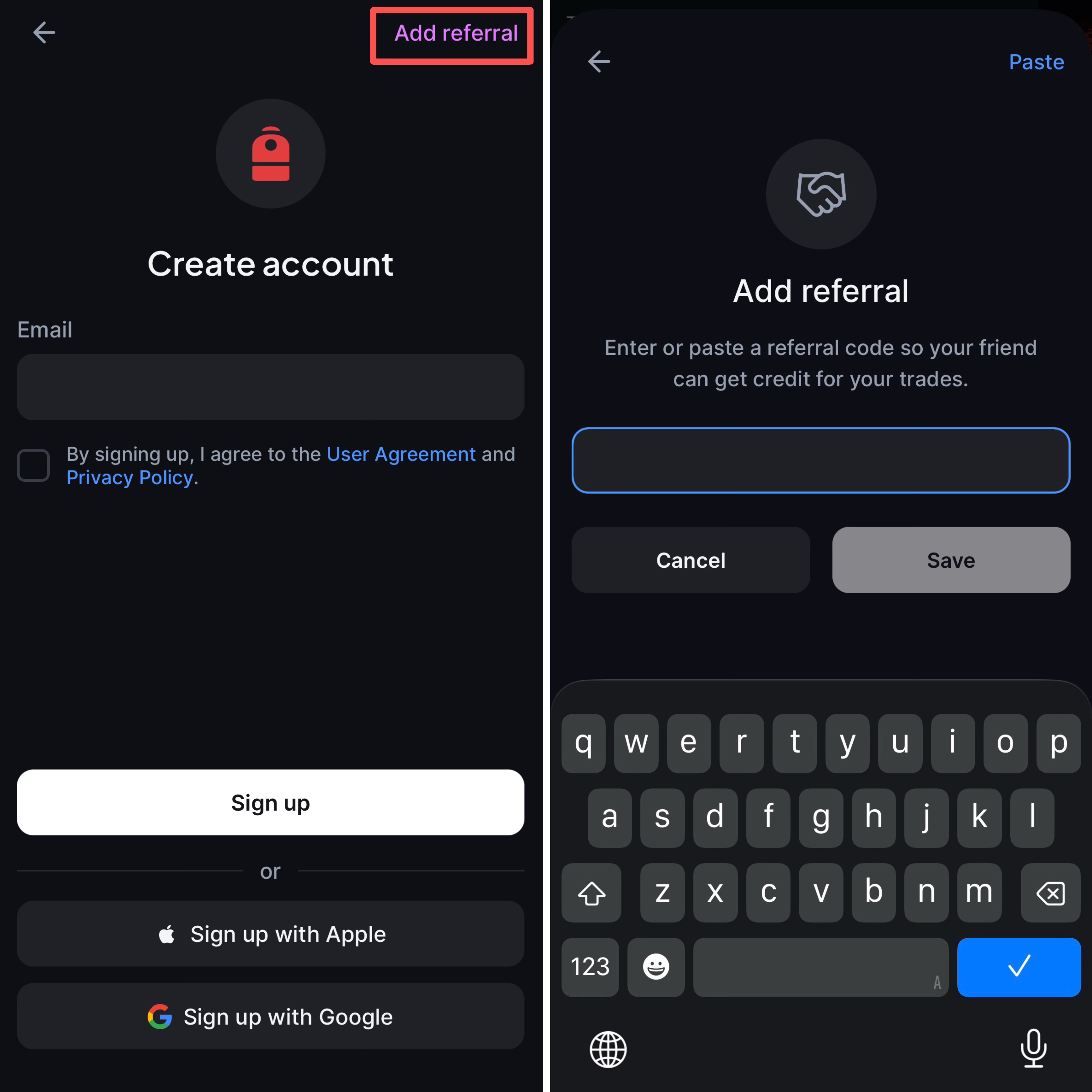
Откройте приложение Backpack и нажмите **Create account**. Вы можете зарегистрироваться одним из следующих способов:
* **Электронная почта:** Введите адрес электронной почты и выполните шаги регистрации ниже.
* **Google или Apple:** Выберите **Sign up with Google** или **Sign up with Apple** и следуйте инструкциям на экране. Подробные шаги см. в разделе [Регистрация и вход через Google или Apple](/support-docs/ru/birzha/bezopasnost/vkhod-cherez-google-i-apple/registraciya-i-vkhod-cherez-google-ili-apple.md).
{% hint style="info" %}
Вход через Google и Apple недоступен на Backpack EU и в Великобритании.
{% endhint %}
### Создайте аккаунт с помощью электронной почты
{% stepper %}
{% step %}
**Введите действительный адрес электронной почты**
:warning:***Примечание:*** Позже в процессе регистрации вам потребуется доступ к этой учетной записи электронной почты.
{% endstep %}
{% step %}
**Введите реферальный код** (если есть).
{% endstep %}
{% step %}
После нажатия **“Sign Up,”** создайте **надежный и уникальный пароль**.
{% endstep %}
{% step %}
Нажмите **“Next,”** затем введите **одноразовый код (OTP)**, отправленный на вашу зарегистрированную электронную почту.
{% endstep %}
{% step %}
Нажмите **"Start"**, чтобы начать процесс **проверки личности**.
* **Выберите вашу страну проживания**, затем нажмите **“Next.”**
* [Поддерживаемые регионы](https://support.backpack.exchange/support-docs/ru/~/revisions/RbwIQnK0edhHXYthljfz/birzha/akkaunt-birzhi/verifikaciya-lichnosti/podderzhivaemye-regiona)
* [Подтверждение адреса (Proof of Address, PoA)](https://support.backpack.exchange/support-docs/ru/~/revisions/RbwIQnK0edhHXYthljfz/birzha/akkaunt-birzhi/verifikaciya-lichnosti/neobkhodimye-dokumenty-dlya-kyc#podtverzhdenie-adresa-proof-of-address-poa)
* **Введите вашу личную информацию**, затем нажмите **“Continue.”**
* **Введите ваш адрес** точно так, как он указан в вашем удостоверении личности, выданном государством.
* **Выберите ваш источник средств и статус занятости честно**, затем нажмите **“Continue.”**
* **Укажите альтернативную контактную информацию**, затем нажмите **“Continue.”**
* **Подтвердите вашу личность.**
{% endstep %}
{% endstepper %}
---
# Agent Instructions
This documentation is published with GitBook. GitBook is the documentation platform designed so that both humans and AI agents can read, navigate, and reason over technical content effectively. Learn more at gitbook.com.
## Querying This Documentation
If you need additional information that is not directly available in this page, you can query the documentation by asking a question.
Perform an HTTP GET request on the following URL with the `ask` and `goal` query parameters:
```
GET https://support.backpack.exchange/support-docs/ru/birzha/akkaunt-birzhi/sozdanie-novogo-akkaunta/sozdanie-akkaunta-v-prilozhenii.md?ask=&goal=
```
`ask` is the immediate question: it should be specific, self-contained, and written in natural language.
`goal` is what the user is ultimately trying to achieve, the reason they need the answer. Sharing it helps GitBook give you a better, more relevant answer. A goal is most helpful when it describes the outcome the user wants rather than restating the question. For example, with `ask=how do I create an API token`, a goal like `automate deployments from our CI pipeline` lets GitBook tailor the answer to that use case.
The response will contain a direct answer to the question and relevant excerpts and sources from the documentation.
Use this mechanism when the answer is not explicitly present in the current page, you need clarification or additional context, or you want to retrieve related documentation sections.