> For the complete documentation index, see [llms.txt](https://support.backpack.exchange/llms.txt). Markdown versions of documentation pages are available by appending `.md` to page URLs; this page is available as [Markdown](https://support.backpack.exchange/support-docs/es/exchange/depositos-y-retiros/cripto/depositos/como-depositar.md).
# ¿Cómo Depositar?
#### Activos de depósito comunes y redes soportadas
| Activo | Redes de depósito soportadas |
| -------- | ------------------------------------------------------------------------ |
| **USDC** | Solana, Ethereum, SUI, Arbitrum, Base, Optimism, Polygon, Sei EVM, Aptos |
| **USDT** | Solana, Ethereum, Tron |
| **BTC** | Bitcoin, Solana (Coinbase BTC) |
| **ETH** | Ethereum, Arbitrum, Base, Optimism |
| **SOL** | Solana |
### :warning:**Notas importantes**
### 1. Depósitos de stablecoins soportados
Backpack Exchange solo admite **depósitos de stablecoins nativas** en sus respectivas redes.\
Depositar la versión incorrecta de una stablecoin puede resultar en que tus fondos no se acrediten.
#### Ejemplo: red Optimism
En la red Optimism, Backpack solo admite depósitos de **USDT0** con la dirección de contrato:
{% code collapsedlinecount="10" %}
```
0x01bFF41798a0BcF287b996046Ca68b395DbC1071
```
{% endcode %}
**No** admitimos depósitos de USDT con la dirección de contrato:
{% code collapsedlinecount="10" %}
```
0x94b008aA00579c1307B0EF2c499aD98a8ce58e58
```
{% endcode %}
{% hint style="danger" %}
Si depositas USDT (no USDT0) en Optimism, los fondos no se acreditarán en tu cuenta de Backpack.
{% endhint %}
{% hint style="info" %}
**Nota:** Backpack Exchange actualmente solo admite USDC nativo en cada red soportada. Las versiones bridged o wrapped de USDC (como USDC.e) no están soportadas. Depositar estas versiones puede resultar en la pérdida de fondos o en un largo proceso de recuperación, si la recuperación es posible.
{% endhint %}
### 2. Cómo evitar errores de depósito
Antes de realizar una transferencia:
1. **Verifica** cuidadosamente la dirección de depósito y la red
2. **Lee** todos los avisos y advertencias que se muestran en la página de depósito
3. **Contacta** a nuestro equipo de soporte oficial si no estás seguro de qué red o token usar
{% hint style="info" %}
**Los depósitos incorrectos pueden resultar en:**
* ⚠️ Pérdida permanente de fondos, o
* ⏳ Un largo proceso de reembolso (si la recuperación es posible)
{% endhint %}
***
### Depósito vía dirección de wallet del exchange
#### 1. Abre el menú Depositar
{% hint style="info" %}
Si realizas un depósito desde el móvil, simplemente toca el botón **Depositar** en la página de **Inicio** o en la página de **Portfolio**.
{% endhint %}
#### 2. Elige la criptomoneda que deseas depositar
Busca el token si no lo ves en la lista.
#### 3. Copia la dirección de la wallet
#### 4. Pega la dirección en tu plataforma de envío e inicia la transferencia (desde una wallet no custodial o un exchange)
***
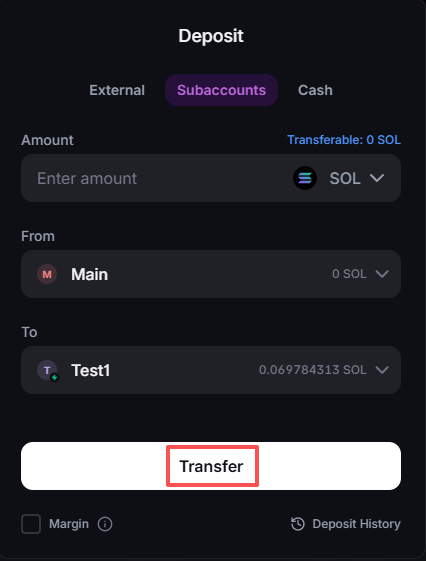
### Depósito vía subcuentas
#### 1. Abre el menú Depositar
{% hint style="info" %}
Si realizas un depósito desde el móvil, simplemente toca el botón **Depositar** en la página de **Inicio** o en la página de **Portfolio**.
{% endhint %}
#### 2. Elige la criptomoneda que deseas depositar
#### 3. Ingresa el monto del depósito y **selecciona la subcuenta de origen ("From") y la subcuenta de destino ("To").**
#### 4. Haz clic en el botón "Transferir".
---
# Agent Instructions
This documentation is published with GitBook. GitBook is the documentation platform designed so that both humans and AI agents can read, navigate, and reason over technical content effectively. Learn more at gitbook.com.
## Querying This Documentation
If you need additional information that is not directly available in this page, you can query the documentation by asking a question.
Perform an HTTP GET request on the following URL with the `ask` and `goal` query parameters:
```
GET https://support.backpack.exchange/support-docs/es/exchange/depositos-y-retiros/cripto/depositos/como-depositar.md?ask=&goal=
```
`ask` is the immediate question: it should be specific, self-contained, and written in natural language.
`goal` is what the user is ultimately trying to achieve, the reason they need the answer. Sharing it helps GitBook give you a better, more relevant answer. A goal is most helpful when it describes the outcome the user wants rather than restating the question. For example, with `ask=how do I create an API token`, a goal like `automate deployments from our CI pipeline` lets GitBook tailor the answer to that use case.
The response will contain a direct answer to the question and relevant excerpts and sources from the documentation.
Use this mechanism when the answer is not explicitly present in the current page, you need clarification or additional context, or you want to retrieve related documentation sections.