> For the complete documentation index, see [llms.txt](https://support.backpack.exchange/llms.txt). Markdown versions of documentation pages are available by appending `.md` to page URLs; this page is available as [Markdown](https://support.backpack.exchange/support-docs/cn/qian-bao/cao-zuo-zhi-nan/ru-he-tong-guo-moonpay-zai-backpack-qian-bao-zhong-mai-mai-jia-mi-huo-bi/shi-yong-moonpay-chu-shou-jia-mi-huo-bi.md).

# 使用 MoonPay 出售加密货币

你可以在 Backpack 钱包中，直接使用 MoonPay 将支持的代币转换为法币。

> Backpack 钱包新用户？请先[下载应用程序或浏览器扩展](/support-docs/cn/kai-shi-shi-yong/xia-zai-lian-jie.md)，然后设置钱包。

### 操作步骤

#### **1. 点击 “现金” 按钮**

<div align="left"><figure><img src="https://592295428-files.gitbook.io/~/files/v0/b/gitbook-x-prod.appspot.com/o/spaces%2Fp2WpAGNII69RQ8wSTC1p%2Fuploads%2FYrSvna4XrYYZZ7YnT1l6%2Fimage.png?alt=media&amp;token=a1a08a73-c37c-4699-aeed-c32d815b0e87" alt="" width="362"><figcaption></figcaption></figure></div>

***

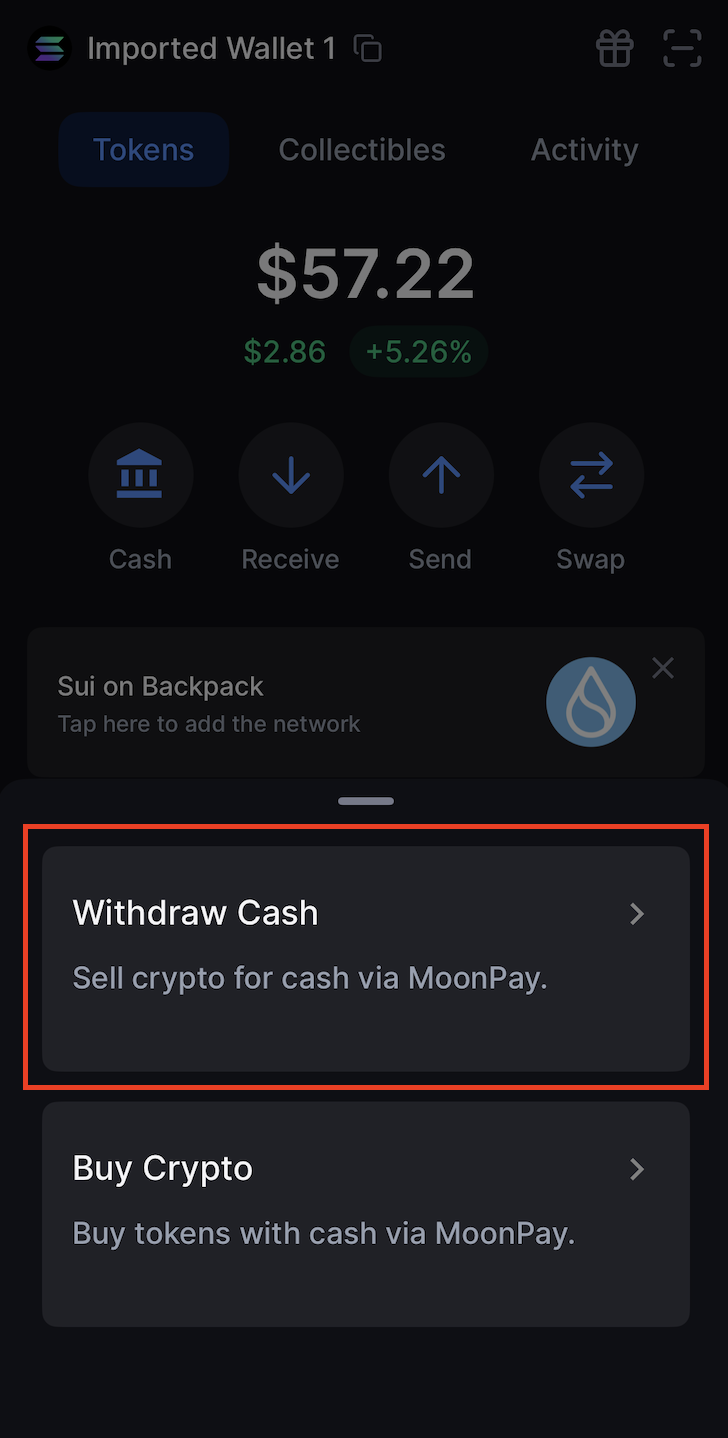
#### **2. 选择 “提现”**

<div align="left"><figure><img src="https://592295428-files.gitbook.io/~/files/v0/b/gitbook-x-prod.appspot.com/o/spaces%2Fp2WpAGNII69RQ8wSTC1p%2Fuploads%2F7tkYDj0NXZqAJRS1kCRw%2Fimage.png?alt=media&amp;token=f36e4cc1-467c-4fe1-9289-628dfd313b9a" alt="" width="364"><figcaption></figcaption></figure></div>

***

#### **3. 选择你希望出售的币种**

<div align="left"><figure><img src="https://592295428-files.gitbook.io/~/files/v0/b/gitbook-x-prod.appspot.com/o/spaces%2Fp2WpAGNII69RQ8wSTC1p%2Fuploads%2FxkpZoJWVqz22L337Xr2Y%2Fimage.png?alt=media&amp;token=60985987-42be-4c1d-a06a-5e0ce3dc3e7f" alt="" width="360"><figcaption></figcaption></figure></div>

**注意：** 你将被重定向至 MoonPay 页面

#### **4. 输入你想出售的金额并选择货币**

<div align="left"><figure><img src="https://592295428-files.gitbook.io/~/files/v0/b/gitbook-x-prod.appspot.com/o/spaces%2Fp2WpAGNII69RQ8wSTC1p%2Fuploads%2FpIHtE33qCrpEXbhJI9uf%2Fimage.png?alt=media&amp;token=4aae4d7d-5b37-4bc6-8f22-fa833326683e" alt="" width="359"><figcaption></figcaption></figure></div>

***

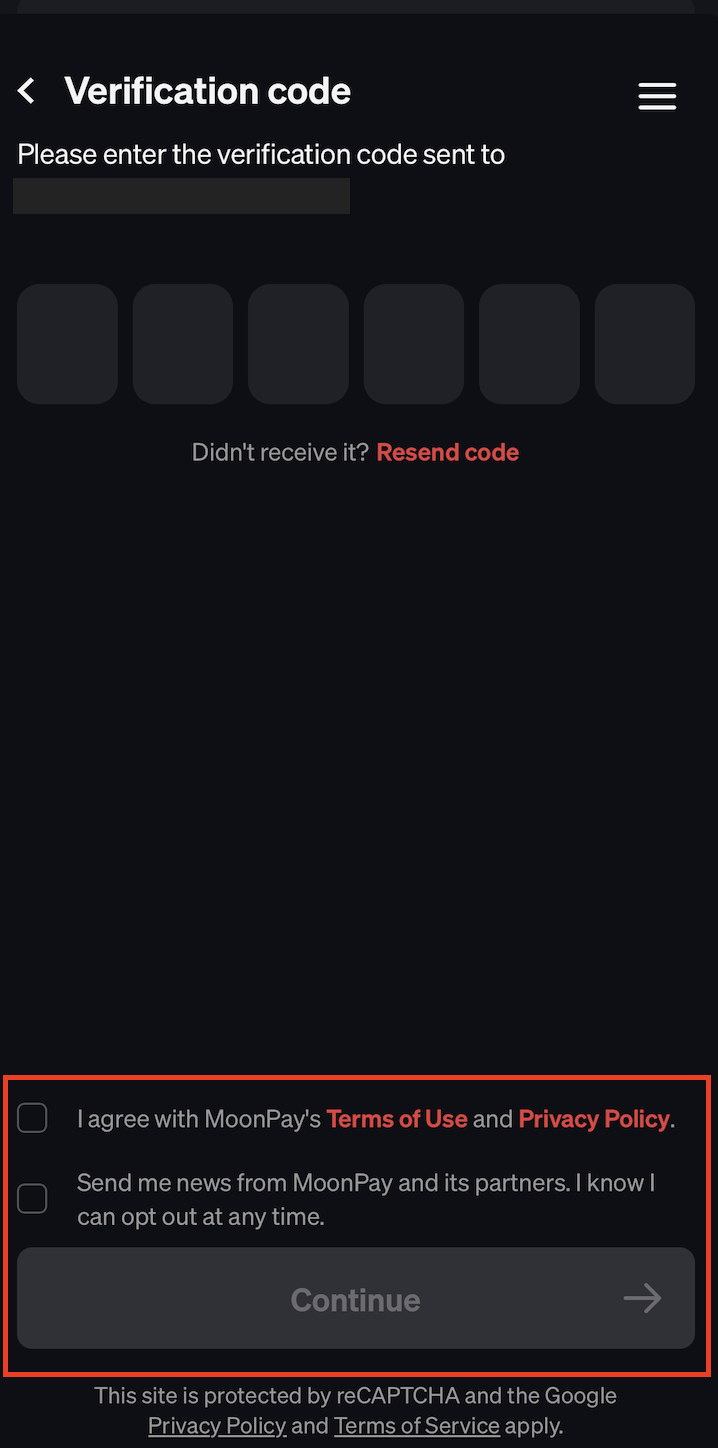
#### **5. 在 MoonPay 页面结账，同意服务条款并点击 “继续”**

**注意：** 首次使用 MoonPay 时，系统会引导你直接通过 MoonPay 的界面完成结账。根据合规要求，你需要提供个人信息并完成身份验证（KYC）过程，之后你的交易才能被处理。

<div align="left"><figure><img src="https://592295428-files.gitbook.io/~/files/v0/b/gitbook-x-prod.appspot.com/o/spaces%2Fp2WpAGNII69RQ8wSTC1p%2Fuploads%2FwvtPTgrqtYBl1tGLvOWZ%2Fimage.png?alt=media&amp;token=a2281526-a7a4-4440-ab59-f2534052437b" alt="" width="362"><figcaption></figcaption></figure></div>

#### **输入发送到你的电子邮箱或手机的验证码，并同意使用条款**

<div align="left"><figure><img src="https://592295428-files.gitbook.io/~/files/v0/b/gitbook-x-prod.appspot.com/o/spaces%2Fp2WpAGNII69RQ8wSTC1p%2Fuploads%2FhtB0RF6mvc8b0z5VjlB1%2Fimage.png?alt=media&amp;token=e6882e28-3cf2-423f-af05-0285b922bbc2" alt="" width="359"><figcaption></figcaption></figure></div>

#### **提供个人信息并完成身份验证**

<div align="left"><figure><img src="https://592295428-files.gitbook.io/~/files/v0/b/gitbook-x-prod.appspot.com/o/spaces%2Fp2WpAGNII69RQ8wSTC1p%2Fuploads%2FeYp0sqxkjlcE8hYwyYI6%2Fimage.png?alt=media&amp;token=576b051b-b2e1-4624-81ac-e34d35100a17" alt="" width="361"><figcaption></figcaption></figure></div>

***

#### **6. 创建出售订单，选择或添加你的提现方式**

<div align="left"><figure><img src="https://592295428-files.gitbook.io/~/files/v0/b/gitbook-x-prod.appspot.com/o/spaces%2Fp2WpAGNII69RQ8wSTC1p%2Fuploads%2Fj1kiRWtq2uWoyMvG6Rum%2F1747377817646.jpg?alt=media&amp;token=dade1b7d-cc7b-43dd-ac6f-fc6fd89ac6a0" alt=""><figcaption></figcaption></figure> <figure><img src="https://592295428-files.gitbook.io/~/files/v0/b/gitbook-x-prod.appspot.com/o/spaces%2Fp2WpAGNII69RQ8wSTC1p%2Fuploads%2FcNiVbaSS5XRnNcGOT0JW%2F32.png?alt=media&amp;token=c5973871-22ba-4ca2-b89b-c6aeee84277e" alt="" width="341"><figcaption></figcaption></figure></div>

***

#### **7. 点击 “查看充值信息”，并将资产发送至提供的 MoonPay 地址**

<div align="left"><figure><img src="https://592295428-files.gitbook.io/~/files/v0/b/gitbook-x-prod.appspot.com/o/spaces%2Fp2WpAGNII69RQ8wSTC1p%2Fuploads%2FzxaraALW2roV90JcVQf9%2Fimage.png?alt=media&amp;token=76a505b2-3143-44e0-9ac2-1e7cdebdb924" alt="" width="375"><figcaption></figcaption></figure> <figure><img src="https://592295428-files.gitbook.io/~/files/v0/b/gitbook-x-prod.appspot.com/o/spaces%2Fp2WpAGNII69RQ8wSTC1p%2Fuploads%2FNHajuBt3VYonUK16RePg%2F42.png?alt=media&amp;token=ef87b88b-241a-46e1-9235-0169bc004140" alt="" width="375"><figcaption></figcaption></figure></div>

#### **将资产发送至 MoonPay 并完成审批流程**

<div align="left"><figure><img src="https://592295428-files.gitbook.io/~/files/v0/b/gitbook-x-prod.appspot.com/o/spaces%2Fp2WpAGNII69RQ8wSTC1p%2Fuploads%2F5XCDRZt871YU7qMVJQU6%2Fimage.png?alt=media&amp;token=af8f7088-6e5e-4316-9c41-6a9b9810ea31" alt="" width="360"><figcaption></figcaption></figure></div>

***

#### **8. 跟踪你的订单状态**

<div align="left"><figure><img src="https://592295428-files.gitbook.io/~/files/v0/b/gitbook-x-prod.appspot.com/o/spaces%2Fp2WpAGNII69RQ8wSTC1p%2Fuploads%2FLyEm4DvEj4ARi61y3j1I%2Fimage.png?alt=media&amp;token=ecdce5e4-27fb-4ecd-b821-a64bbc16a326" alt="" width="375"><figcaption></figcaption></figure></div>

***

### **需要帮助处理 MoonPay 交易吗？**

**重要提示：**

Backpack 不处理任何支付相关操作，所有的账单、结算及退款均由 MoonPay 负责。\
如你对 MoonPay 交易有任何问题（如付款状态、延迟、退款或验证等），请直接联系其客服团队： [https://support.moonpay.com](https://support.moonpay.com/)


---

# Agent Instructions
This documentation is published with GitBook. GitBook is the documentation platform designed so that both humans and AI agents can read, navigate, and reason over technical content effectively. Learn more at gitbook.com.

## Querying This Documentation
If you need additional information that is not directly available in this page, you can query the documentation by asking a question.

Perform an HTTP GET request on the following URL with the `ask` and `goal` query parameters:

```
GET https://support.backpack.exchange/support-docs/cn/qian-bao/cao-zuo-zhi-nan/ru-he-tong-guo-moonpay-zai-backpack-qian-bao-zhong-mai-mai-jia-mi-huo-bi/shi-yong-moonpay-chu-shou-jia-mi-huo-bi.md?ask=<question>&goal=<user_goal>
```

`ask` is the immediate question: it should be specific, self-contained, and written in natural language.
`goal` is what the user is ultimately trying to achieve, the reason they need the answer. Sharing it helps GitBook give you a better, more relevant answer. A goal is most helpful when it describes the outcome the user wants rather than restating the question. For example, with `ask=how do I create an API token`, a goal like `automate deployments from our CI pipeline` lets GitBook tailor the answer to that use case.

The response will contain a direct answer to the question and relevant excerpts and sources from the documentation.

Use this mechanism when the answer is not explicitly present in the current page, you need clarification or additional context, or you want to retrieve related documentation sections.