> For the complete documentation index, see [llms.txt](https://support.backpack.exchange/llms.txt). Markdown versions of documentation pages are available by appending `.md` to page URLs; this page is available as [Markdown](https://support.backpack.exchange/support-docs/cn/jiao-yi-suo/jiao-yi/xian-huo/xian-huo-gang-gan/xian-huo-gang-gan-jiao-yi.md).
# 现货杠杆交易
现货杠杆交易允许您 **以抵押品为担保借入资产**,从而扩大现货仓位规模。您交易的是标的资产,借入的资金会 **产生利息**,并在之后偿还。
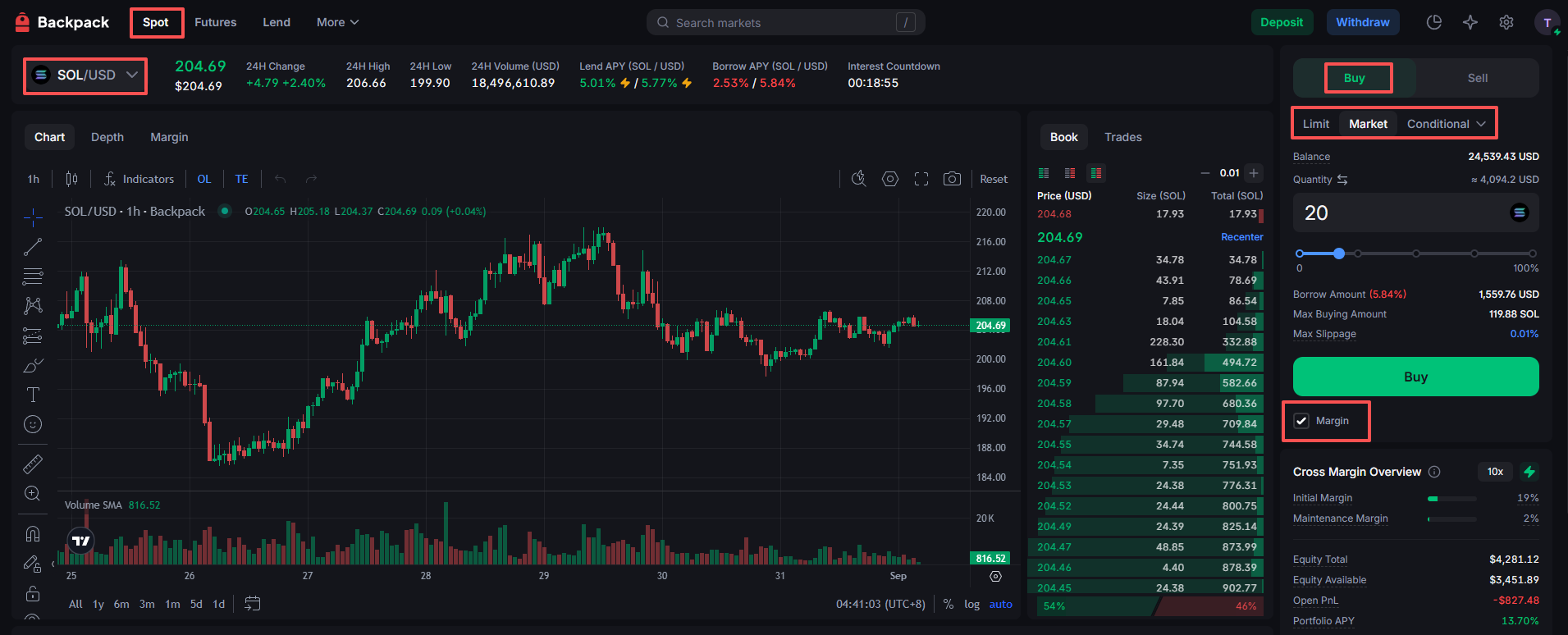
## 在网页端进行现货杠杆交易
1. **向交易所账户充值(加密货币或法币)**
* [加密货币充值](/support-docs/cn/jiao-yi-suo/chong-zhi-he-ti-xian/jia-mi-huo-bi/chong-zhi.md)
* [法币充值](/support-docs/cn/jiao-yi-suo/chong-zhi-he-ti-xian/fa-bi/ru-he-tong-guo-dian-hui-chong-zhi.md)
2. **进入现货交易区**
* 选择您想交易的交易对(例如 SOL/USD)
* 选择交易方向(买入/卖出)
3. **选择**[**订单类型**](/support-docs/cn/jiao-yi-suo/jiao-yi/ding-dan-lei-xing.md)
4. **输入必要参数**
* 价格
* 数量
5. **勾选 “Margin” 选项框**
6. **提交订单**
***
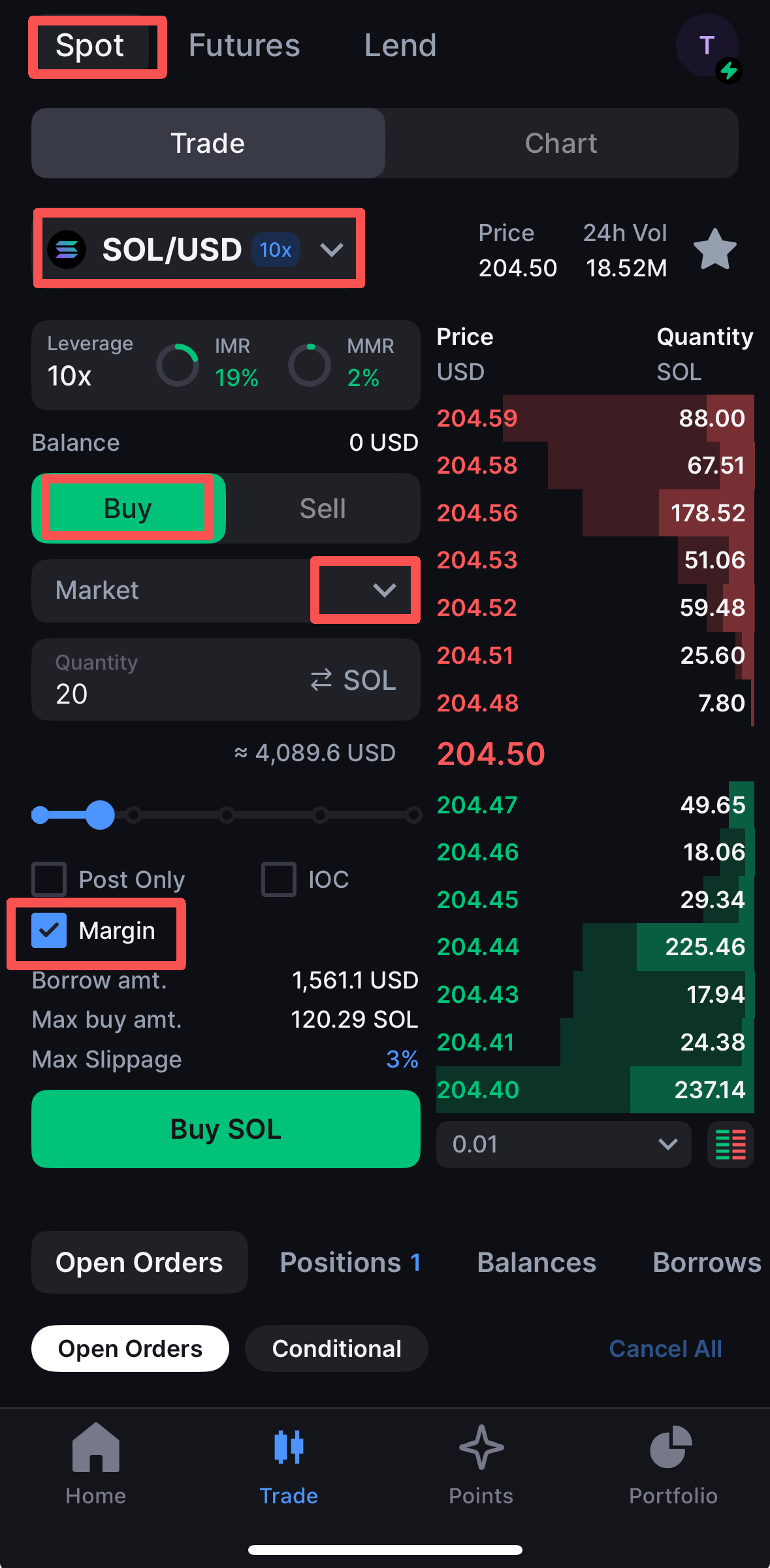
## 在移动端进行现货杠杆交易
1. **向交易所账户充值(加密货币或法币)**
* [加密货币充值](/support-docs/cn/jiao-yi-suo/chong-zhi-he-ti-xian/jia-mi-huo-bi/chong-zhi.md)
* [法币充值](/support-docs/cn/jiao-yi-suo/chong-zhi-he-ti-xian/fa-bi/ru-he-tong-guo-dian-hui-chong-zhi.md)
2. **进入现货交易区**
* 选择您想交易的交易对(例如 SOL/USD)
* 选择交易方向(买入/卖出)
3. **选择**[**订单类型**](/support-docs/cn/jiao-yi-suo/jiao-yi/ding-dan-lei-xing.md)
4. **输入必要参数**
* 价格
* 数量
5. **勾选 “Margin” 选项框**
6. **提交订单**
***
## 常见问题解答
现货杠杆交易的费用有哪些?
现货杠杆交易通常涉及以下费用:
* **借入资金的利息 (Interest on Borrowed Funds)**\
借入资金需要支付利息,利率因币种而异。您可以在**借贷页面 (lending page)** 切换不同币种,查看该币种的实时借贷利率。
* **交易手续费 (Trading Fees)**\
标准交易手续费适用于买入和卖出订单,费率取决于您的 VIP 等级或挂单/吃单身份。
什么是现货杠杆交易中的杠杆?
杠杆让您能够以较少的初始投资控制更大的仓位。\
例如,使用 3 倍杠杆,您可以用存入抵押品的 1 倍资金交易 3 倍的头寸规模。
⚠️ 杠杆会放大潜在利润,同时也会增加亏损风险。
我能否在现货杠杆交易中使用多种杠杆选项?
* **可以。** 您可以根据自己的风险承受能力以及所交易的币对,为每笔交易选择不同的杠杆倍数。但请注意,较高杠杆伴随更高的风险。
* 请注意:每个币种都有其自身的**最高杠杆限制**,该限制会根据头寸规模而变化。
我在现货杠杆交易中会被强制平仓吗?
当您的保证金余额低于所需的维持保证金 (MMR) 时,就会发生强制平仓。\
如果发生这种情况,您的仓位将会被自动平掉,用来偿还借入的资金。这可能会导致您损失抵押品。
如何在现货杠杆交易中避免被强制平仓?
* 时刻监控你账户的 **维持保证金比率 (MMR)**。当 MMR ≥ 100% 时,你的账户将进入强制平仓状态。
* 您也可以设置 **止损单 (Stop-Loss orders)**,在市场走势对您不利时自动平掉仓位,从而降低风险。
{% hint style="info" %}
### 👉了解更多关于[现货杠杆](/technical-docs/cn/jiao-yi/xian-huo-gang-gan.md)交易的信息
{% endhint %}
---
# Agent Instructions
This documentation is published with GitBook. GitBook is the documentation platform designed so that both humans and AI agents can read, navigate, and reason over technical content effectively. Learn more at gitbook.com.
## Querying This Documentation
If you need additional information that is not directly available in this page, you can query the documentation dynamically by asking a question.
Perform an HTTP GET request on the current page URL with the `ask` query parameter, and the optional `goal` query parameter:
```
GET https://support.backpack.exchange/support-docs/cn/jiao-yi-suo/jiao-yi/xian-huo/xian-huo-gang-gan/xian-huo-gang-gan-jiao-yi.md?ask=&goal=
```
`ask` is the immediate question: it should be specific, self-contained, and written in natural language.
`goal` is optional and describes the broader end goal you are ultimately trying to accomplish on behalf of the user. GitBook uses it to tailor the answer towards what is most useful for that goal.
The response will contain a direct answer to the question and relevant excerpts and sources from the documentation.
Use this mechanism when the answer is not explicitly present in the current page, you need clarification or additional context, or you want to retrieve related documentation sections.