> For the complete documentation index, see [llms.txt](https://support.backpack.exchange/llms.txt). Markdown versions of documentation pages are available by appending `.md` to page URLs; this page is available as [Markdown](https://support.backpack.exchange/support-docs/cn/jiao-yi-suo/chong-zhi-he-ti-xian/jia-mi-huo-bi/chong-zhi/ru-he-chong-zhi-jia-mi-huo-bi.md).

# 如何充值加密货币？

#### 常见充值资产及支持网络

| 资产       | 支持的充值网络                                                                  |
| -------- | ------------------------------------------------------------------------ |
| **USDC** | Solana, Ethereum, SUI, Arbitrum, Base, Optimism, Polygon, Sei EVM, Aptos |
| **USDT** | Solana, Ethereum, Tron                                                   |
| **BTC**  | Bitcoin, Solana (Coinbase BTC)                                           |
| **ETH**  | Ethereum, Arbitrum, Base, Optimism                                       |
| **SOL**  | Solana                                                                   |

### :warning:**重要提示**

### 1. 支持的稳定币充值

Backpack 交易所仅支持各网络的**原生稳定币（native stablecoin）充值**。\
充值错误版本的稳定币可能会导致资金无法入账。

#### 示例：Optimism 网络

在 Optimism 网络上，Backpack 仅支持以下合约地址的 **USDT0** 充值：

```
0x01bFF41798a0BcF287b996046Ca68b395DbC1071
```

我们**不支持**以下合约地址的 USDT 充值：

```
0x94b008aA00579c1307B0EF2c499aD98a8ce58e58
```

{% hint style="danger" %}
如果您在 Optimism 网络充值 USDT（非 USDT0），资金将不会到账至您的 Backpack 账户。
{% endhint %}

{% hint style="info" %}
**注意：** Backpack 交易所目前仅支持各支持网络上的原生 USDC。不支持桥接版或封装版的 USDC（例如 USDC.e）。充值这些版本可能会导致资金丢失，或需要漫长的找回流程（若可找回）。
{% endhint %}

### 2. 如何避免充值错误

在进行转账前：

1. **仔细核对**充值地址和网络
2. **阅读**充值页面上显示的所有提示与警告信息
3. 如不确定应使用哪个网络或代币，请**联系**我们的官方客服团队

{% hint style="info" %}
**充值错误可能导致：**

* ⚠️ 资金永久丢失，或
* ⏳ 需要较长时间的退款处理（若可找回）
  {% endhint %}

***

### 通过交易所钱包地址充币

#### 1. 打开充值菜单

<figure><img src="https://1790800155-files.gitbook.io/~/files/v0/b/gitbook-x-prod.appspot.com/o/spaces%2F3kiM6CAFBZoTCJcZ8X7k%2Fuploads%2F0otvblwY4MsooFfrYSek%2Fimage.png?alt=media&#x26;token=6f1109f1-f984-47ef-be07-a64948ae3f26" alt=""><figcaption></figcaption></figure>

{% hint style="info" %}
如果您是在手机APP端进行充值，只需点击 **主页** 或 **资产总览** 上的 **“充值”** 按钮即可。
{% endhint %}

#### 2. 选择您要充值的加密货币

如果未在列表中找到该币种，请使用搜索功能查找。

<div align="left"><figure><img src="https://1790800155-files.gitbook.io/~/files/v0/b/gitbook-x-prod.appspot.com/o/spaces%2F3kiM6CAFBZoTCJcZ8X7k%2Fuploads%2FHhGorm92T63HNij2wARY%2Ffa52a452d37019ff23a02aadd417b505.jpg?alt=media&#x26;token=a90683ff-bbb0-4805-b739-483546f51972" alt="" width="563"><figcaption></figcaption></figure></div>

#### 3. 复制钱包地址

<div align="left"><figure><img src="https://1790800155-files.gitbook.io/~/files/v0/b/gitbook-x-prod.appspot.com/o/spaces%2F3kiM6CAFBZoTCJcZ8X7k%2Fuploads%2F7xptwCUIIxjq4vxPYB5l%2F5cbb4f28320dfd6f6ff187cb943a5bfa.png?alt=media&#x26;token=21a51e80-d2c8-404b-94e9-9cd7c3671e25" alt="" width="320"><figcaption></figcaption></figure></div>

#### 4. 将地址粘贴到您的转出平台并发起转账（可来自非托管钱包或交易所）

***

### 通过子账户进行充值

#### 1. 打开充值菜单

<figure><img src="https://1790800155-files.gitbook.io/~/files/v0/b/gitbook-x-prod.appspot.com/o/spaces%2F3kiM6CAFBZoTCJcZ8X7k%2Fuploads%2Fu0t2gXcpYbgkfkJpkG43%2Fimage.png?alt=media&#x26;token=1a5a3fa7-606c-42f3-a5d6-b75dd35d85d4" alt=""><figcaption></figcaption></figure>

{% hint style="info" %}
如果您是在手机APP端进行充值，只需点击 **主页** 或 **资产总览** 上的 **“充值”** 按钮即可。
{% endhint %}

#### 2. 选择您要充值的加密货币

<div align="left"><figure><img src="https://1790800155-files.gitbook.io/~/files/v0/b/gitbook-x-prod.appspot.com/o/spaces%2F3kiM6CAFBZoTCJcZ8X7k%2Fuploads%2FmeFn0sZe32i0jS8uhwKH%2Fimage.png?alt=media&#x26;token=d63d495b-3f3d-41c3-a8ff-fb4d2c43392a" alt="" width="316"><figcaption></figcaption></figure></div>

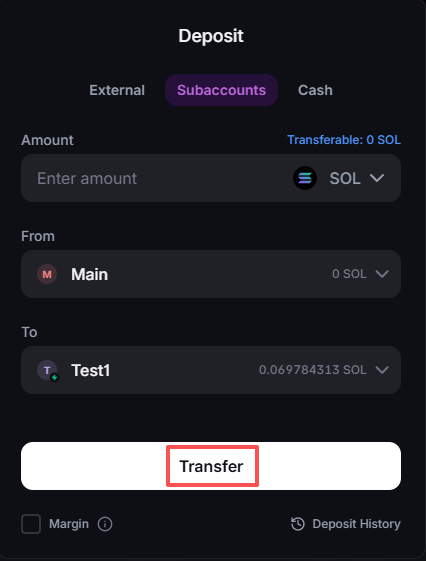
#### 3. 输入充值金额，并**选择“来源”子账户和“目标”子账户**。

<div align="left"><figure><img src="https://1790800155-files.gitbook.io/~/files/v0/b/gitbook-x-prod.appspot.com/o/spaces%2F3kiM6CAFBZoTCJcZ8X7k%2Fuploads%2FeqTggLYZnmZ5nvyvhDQU%2Fimage.png?alt=media&#x26;token=72de12e0-09de-45f0-8a87-f2279f759562" alt="" width="320"><figcaption></figcaption></figure></div>

#### 4. 点击 **转账（Transfer）** 按钮。

<div align="left"><figure><img src="https://1790800155-files.gitbook.io/~/files/v0/b/gitbook-x-prod.appspot.com/o/spaces%2F3kiM6CAFBZoTCJcZ8X7k%2Fuploads%2FoNFvY0CsF886WensmmzS%2Fimage.png?alt=media&#x26;token=8f711a04-fa30-43a5-ba15-d12439b3e75e" alt="" width="320"><figcaption></figcaption></figure></div>


---

# Agent Instructions
This documentation is published with GitBook. GitBook is the documentation platform designed so that both humans and AI agents can read, navigate, and reason over technical content effectively. Learn more at gitbook.com.

## Querying This Documentation
If you need additional information that is not directly available in this page, you can query the documentation by asking a question.

Perform an HTTP GET request on the following URL with the `ask` and `goal` query parameters:

```
GET https://support.backpack.exchange/support-docs/cn/jiao-yi-suo/chong-zhi-he-ti-xian/jia-mi-huo-bi/chong-zhi/ru-he-chong-zhi-jia-mi-huo-bi.md?ask=<question>&goal=<user_goal>
```

`ask` is the immediate question: it should be specific, self-contained, and written in natural language.
`goal` is what the user is ultimately trying to achieve, the reason they need the answer. Sharing it helps GitBook give you a better, more relevant answer. A goal is most helpful when it describes the outcome the user wants rather than restating the question. For example, with `ask=how do I create an API token`, a goal like `automate deployments from our CI pipeline` lets GitBook tailor the answer to that use case.

The response will contain a direct answer to the question and relevant excerpts and sources from the documentation.

Use this mechanism when the answer is not explicitly present in the current page, you need clarification or additional context, or you want to retrieve related documentation sections.