> For the complete documentation index, see [llms.txt](https://support.backpack.exchange/llms.txt). Markdown versions of documentation pages are available by appending `.md` to page URLs; this page is available as [Markdown](https://support.backpack.exchange/exchange/borrow-and-lend/for-japanese-users/how-to-use-borrowlend-jp/how-to-borrow-jpweb.md).
# 借入(Borrow)の見方・操作方法
### 1. 借入(Borrow)は出金画面から行う
Backpackにおける借入(Borrow)は、独立した「借入専用メニュー」からではなく、**「出金(Withdraw)」画面を通じて実行する**設計となっています。
#### 1-1. なぜ「出金画面」から借入を行うのか
これは、Backpackの利用ルールである**「借り入れた資産をそのまま同一アカウント内に保持することはできず、即時に外部ウォレット等へ出金しなければならない」**という仕様に基づいた構造です。
### 2. 借入の操作手順
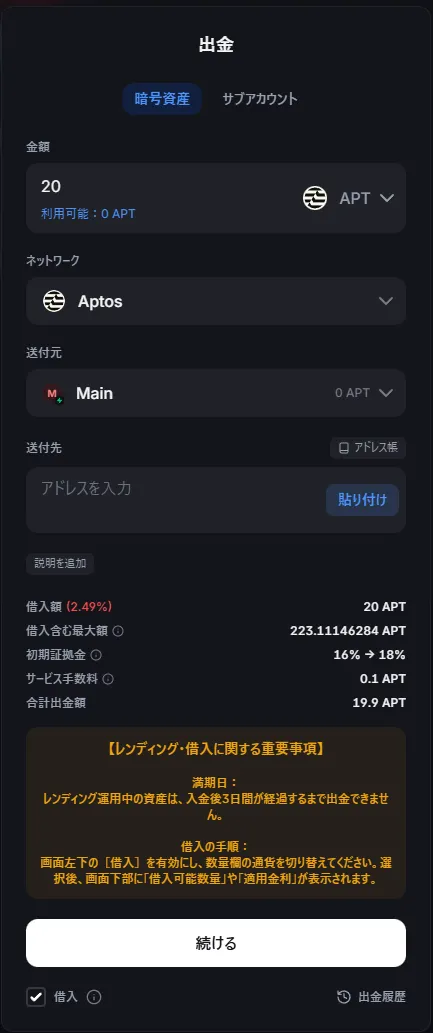
借入を行う場合、以下の手順で操作します。
1. 出金画面を開きます
2. **画面左下の「借入」を有効にします**
3. **金額欄で現在貸出していない暗号資産を選択します**
4. **数量を指定します**
5. 送付元欄で借入元を指定します
6. 送付先で出金先アドレスを指定します。
画面下部に以下の情報が表示されます。
* 借入可能額
* 借入を含めた最大出金可能額
* 適用される借入金利(APY)
画面内【レンディング・借入に関する重要事項】を確認していただいた上、操作してください。
{% hint style="info" %}
**【レンディング・借入に関する重要事項】** \
**満期日:**\
**レンディング運用中の資産は、入金後3日間が経過するまで出金できません。** \
\
**借入の手順:**\
**画面左下の[借入]を有効にし、数量欄の通貨を切り替えてください。**\
**選択後、画面下部に「借入可能数量」や「適用金利」が表示されます。**
{% endhint %}
### 3. 借入時の重要ルール(再確認)
* **即時出金の原則:**\
借り入れた資産は、操作完了と同時に指定した先へ送金されます。同一アカウント内での運用はできません。
* **担保資産への処理:**\
借入を実行すると、担保として機能している資産は、返済が完了するまで出金や内部振替ができなくなります(余剰担保分を除く)。
* **借入できる資産の組み合わせ**:\
借入を行う資産は、担保として利用されている資産とは異なる種類である必要があります。(例:SOLを担保にUSDCを借りることは可能ですが、SOLを担保にSOLを借りることはできません)
* **再借入の制限:**\
返済(入金)後、同一資産を再度借り入れできるようになるまでには3日間(72時間)の処理期間が必要です。
* **金利の変動:** \
借入金利は市場の需給バランスに応じてリアルタイムに変動します。借入需要が高まると金利も上昇するため、定期的にダッシュボードで最新の適用金利を確認してください。
* **清算リスク:**\
証拠金維持率(MMR)が100%に達すると清算が実行され、**1%の手数料**が発生します。
### **4. 借入資産の状況の確認方法**
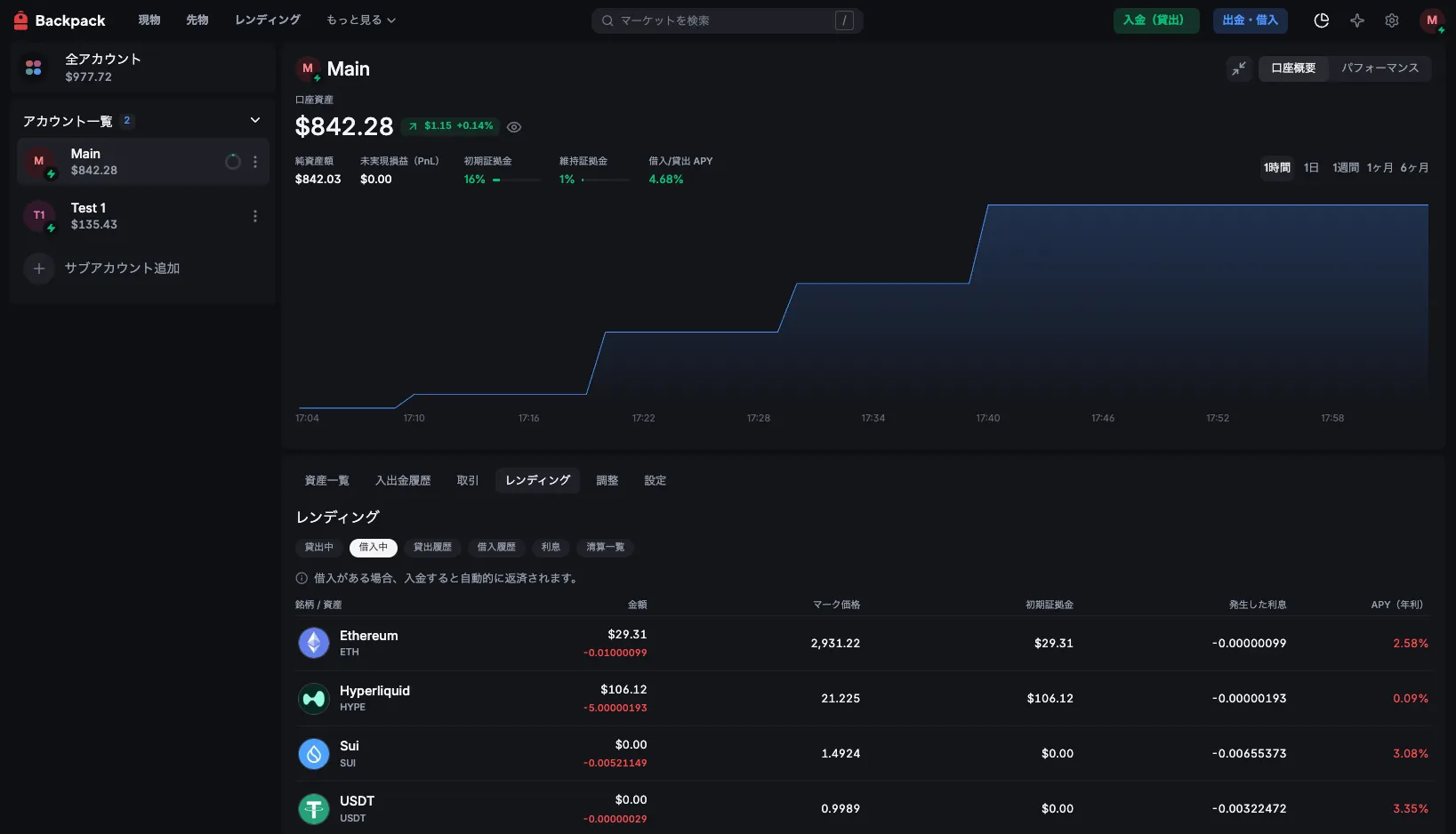
入金後の資産状態は、以下の画面から確認できます。
ポートフォリオページ
→ポートフォリオ内の「レンディング」タブ
→レンディングタブ内の「借入中」タブ
ここでは、
* 現在貸出中の資産
* 現在貸出中の資産の数量(金額)
* マーク価格
* 初期証拠金
* 発生した利息
* APY(年利)
が確認できます。
---
# Agent Instructions
This documentation is published with GitBook. GitBook is the documentation platform designed so that both humans and AI agents can read, navigate, and reason over technical content effectively. Learn more at gitbook.com.
## Querying This Documentation
If you need additional information that is not directly available in this page, you can query the documentation dynamically by asking a question.
Perform an HTTP GET request on the current page URL with the `ask` query parameter, and the optional `goal` query parameter:
```
GET https://support.backpack.exchange/exchange/borrow-and-lend/for-japanese-users/how-to-use-borrowlend-jp/how-to-borrow-jpweb.md?ask=&goal=
```
`ask` is the immediate question: it should be specific, self-contained, and written in natural language.
`goal` is optional and describes the broader end goal you are ultimately trying to accomplish on behalf of the user. GitBook uses it to tailor the answer towards what is most useful for that goal.
The response will contain a direct answer to the question and relevant excerpts and sources from the documentation.
Use this mechanism when the answer is not explicitly present in the current page, you need clarification or additional context, or you want to retrieve related documentation sections.