> For the complete documentation index, see [llms.txt](https://support.backpack.exchange/llms.txt). Markdown versions of documentation pages are available by appending `.md` to page URLs; this page is available as [Markdown](https://support.backpack.exchange/exchange/borrow-and-lend/borrowing.md).
# Borrowing
## How to Borrow?
{% hint style="info" %}
**Before You Borrow**
* Make sure you have sufficient collateral in your account.
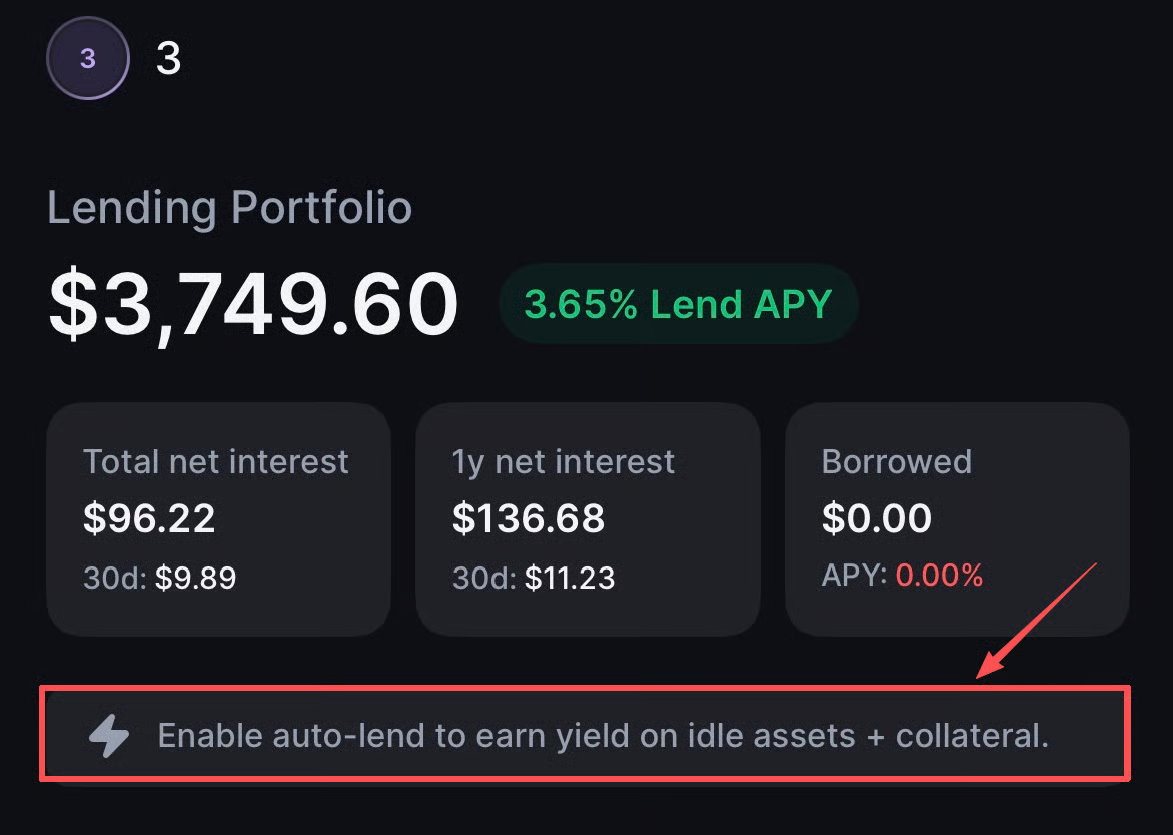
* Ensure **Auto-Lend** is turned off.
{% endhint %}
### Borrow Assets on the Web
Open [**Backpack Exchange**](https://backpack.exchange/) and log in before following the steps below.
> New to Backpack? [Create an account](/exchange/exchange-account/create-a-new-account/how-to-create-an-account-on-the-web.md) to get started.
1. Go to **Lend** page.
2. Select the asset and click **Borrow**.
3. Enter the amount and confirm.
***
### Borrow Assets on Mobile
Open the [**Backpack app**](https://backpack.app/) and log in before following the steps below.
> New to Backpack? [Create an account](/exchange/exchange-account/create-a-new-account/how-to-create-an-account-on-mobile.md) to get started.
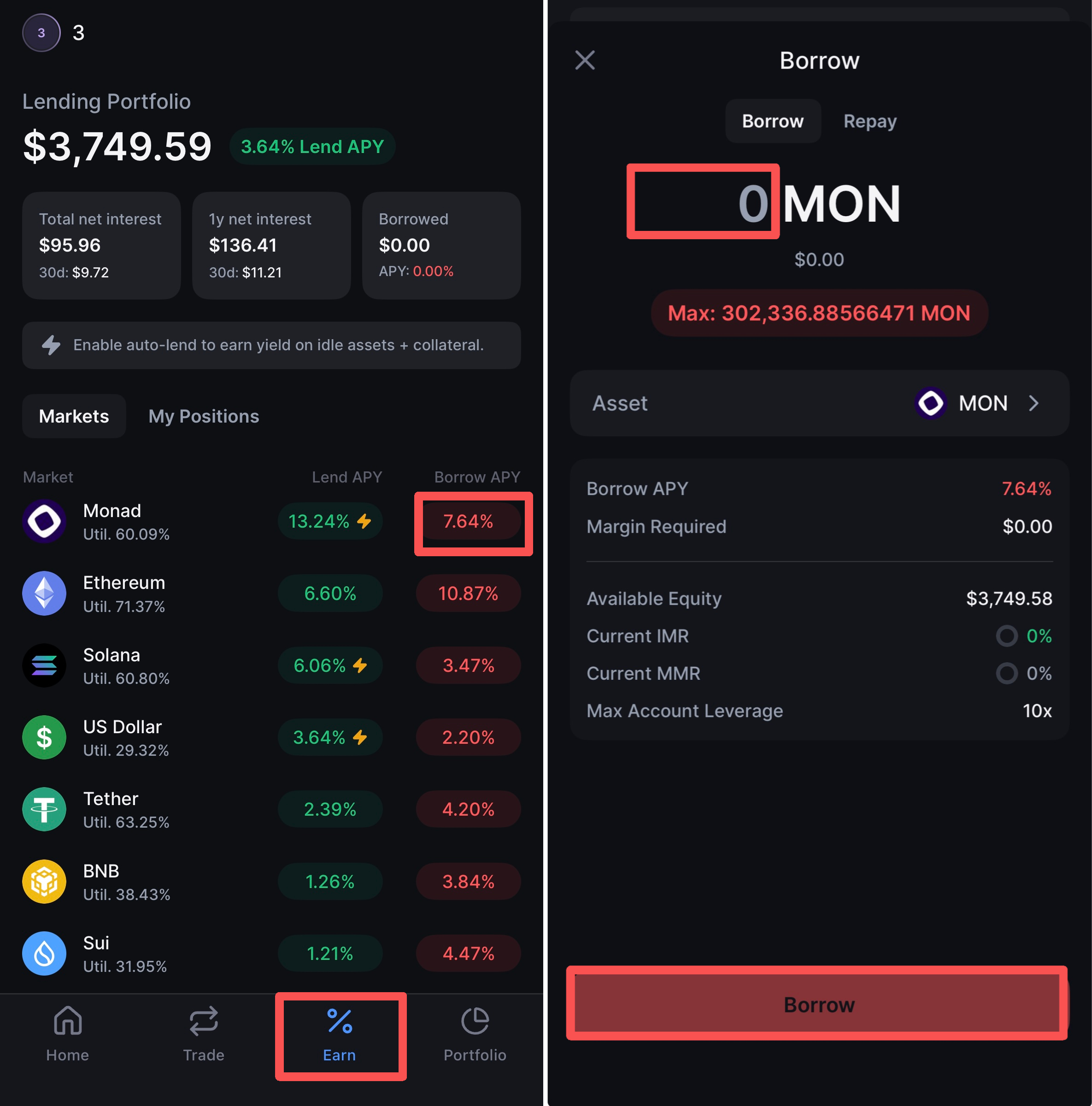
1. Go to the **Earn** page
2. Find the asset you want to borrow (e.g. Monad), then tap the rate under **Borrow APY** **(e.g. 7.64%)**
3. Enter the amount and tap **Borrow** to confirm
***
## Frequently Asked Questions
Why do I have a USDC borrow I didn't create?
If you're trading futures with non-USDC collateral (e.g. USDT, BTC, SOL, or ETH), you may notice a USDC borrow appear on your account that you didn't manually create. This is expected behavior — here's why it happens.
**Futures on Backpack settle in USDC.** This includes PnL, trading fees, and funding payments. Every 10 seconds, your unrealized PnL is realized and your USDC balance is adjusted accordingly.
If you don't hold enough USDC to cover these settlements, the system automatically borrows USDC on your behalf rather than selling your other assets. This is called an **auto-borrow**.
#### Common scenario: depositing USDT
If you deposit USDT and open a futures position:
* Your USDT is used as **collateral** to meet margin requirements
* When fees, funding, or losses need to be settled, the system needs **USDC**
* Since you don't hold USDC, the system **auto-borrows USDC** from the lending pool
* Your USDT remains untouched — it continues to serve as collateral
This means you may see a small USDC borrow accumulate over time as fees and funding are settled, even if your position is profitable.
#### Why not just use my USDT?
USDT and USDC are separate assets. Backpack's futures engine settles exclusively in USDC, so the system borrows USDC specifically rather than converting your USDT. This protects you from unwanted asset conversions and keeps your portfolio composition intact.
#### Does this cost me anything?
Yes — USDC borrows accrue interest based on the current utilization rate. The rate is typically low, but you should be aware it exists. You can view your active borrows on the **Lend** page.
#### How do I avoid auto-borrows?
* **Hold USDC directly** — If you deposit or convert to USDC, settlements are deducted from your balance with no borrowing needed
* **Enable Auto-Lend** — When turned on, any USDC profits are automatically lent and can also be used to repay borrows as they occur
* **Turn off auto-borrow** — You can disable this in the Lend page settings, but note that without it, the system may need to convert your collateral to cover settlements instead
How much can I borrow on Backpack Exchange?
Your borrowing capacity depends on your remaining available equity—the higher your available equity, the more you can borrow.
This is determined by your subaccount leverage setting, the token’s maximum borrowable leverage under different Notional Borrow Size tiers, and your net margin equity.
No manual calculation is needed—you can easily view the maximum borrowable amount for your sub-account directly under the borrow button on the **lend** page.
Adjusting subaccount leverage for borrowing?
* Go to the **Futures** or **Lend** page and locate **Cross Margin Overview** on the right side.
* Under **Account Leverage Limit**, use the slider to set your preferred leverage limit.
* This is a **subaccount-wide setting** and applies across **Lending, Futures, and Spot Margin**.
:warning:**Note:** The selected leverage multiple represents the maximum leverage available to the subaccount. However, **in practice**, it is also **constrained** by the maximum leverage allowed for the specific token in different markets.
Viewing maximum leverage by notional borrow size?
1. Click **“Lend”** to enter the Lending page.
2. Under the **“Models”** tab, click **“Margin.”**
3. Hover your mouse over the curve chart to view the leverage multiples for the selected token under different **Notional Borrow Size** tiers.
4. The value shown as **“Max Initial Leverage”** indicates the maximum multiple of the subaccount’s net equity that can be borrowed for that token.
Why can’t I borrow funds?
1. The **initial margin ratio** has reached **100%**, which means you no longer have any available equity to use as collateral for borrowing.You can borrow funds once you've either added more margin or reduced your position size, bringing the initial margin ratio below 100%.
2. When the **auto-lend** feature is **enabled**, borrowing can only occur through spot margin or withdrawals. If you wish to initiate a manual borrow,simply click the lightning icon next to the leverage multiplier to disable the auto-lend feature. Once it’s turned off, you’ll be able to proceed with the manual loan.
What fees are associated with borrowing on Backpack Exchange?
1. Once a position is opened, **an entry fee** is immediately charged. This fee is equivalent to **a portion** of the hourly interest.
For example, if you collateralize 1 BTC and borrow 2,000 USDC at 12:50 AM, and the next interest calculation occurs at 1:00 AM, then the 10 minutes of accrued interest will be your opening fee.
2. **An hourly interest charge** is applied at every hour on the hour.\
The hourly interest = (Borrowed Amount × Annual Interest Rate) ÷ 365 days ÷ 24 hours.
How do I repay a borrow?
{% hint style="info" %}
Before repaying:
* Make sure you have enough available balance of the asset you’re repaying.
* Ensure **Auto-Lend** is turned off.
{% endhint %}
#### **Repay a Borrow on the Web**
1. Go to **Lend** in the top navigation bar.
2. Select the asset and click **Borrow**.
3. **Click** **Repay.**
4. Enter the repayment amount and confirm.
***You can also enable Auto Lend, which will automatically use available balances to repay loans when possible.***
***
#### **Repay a Borrow on Mobile**
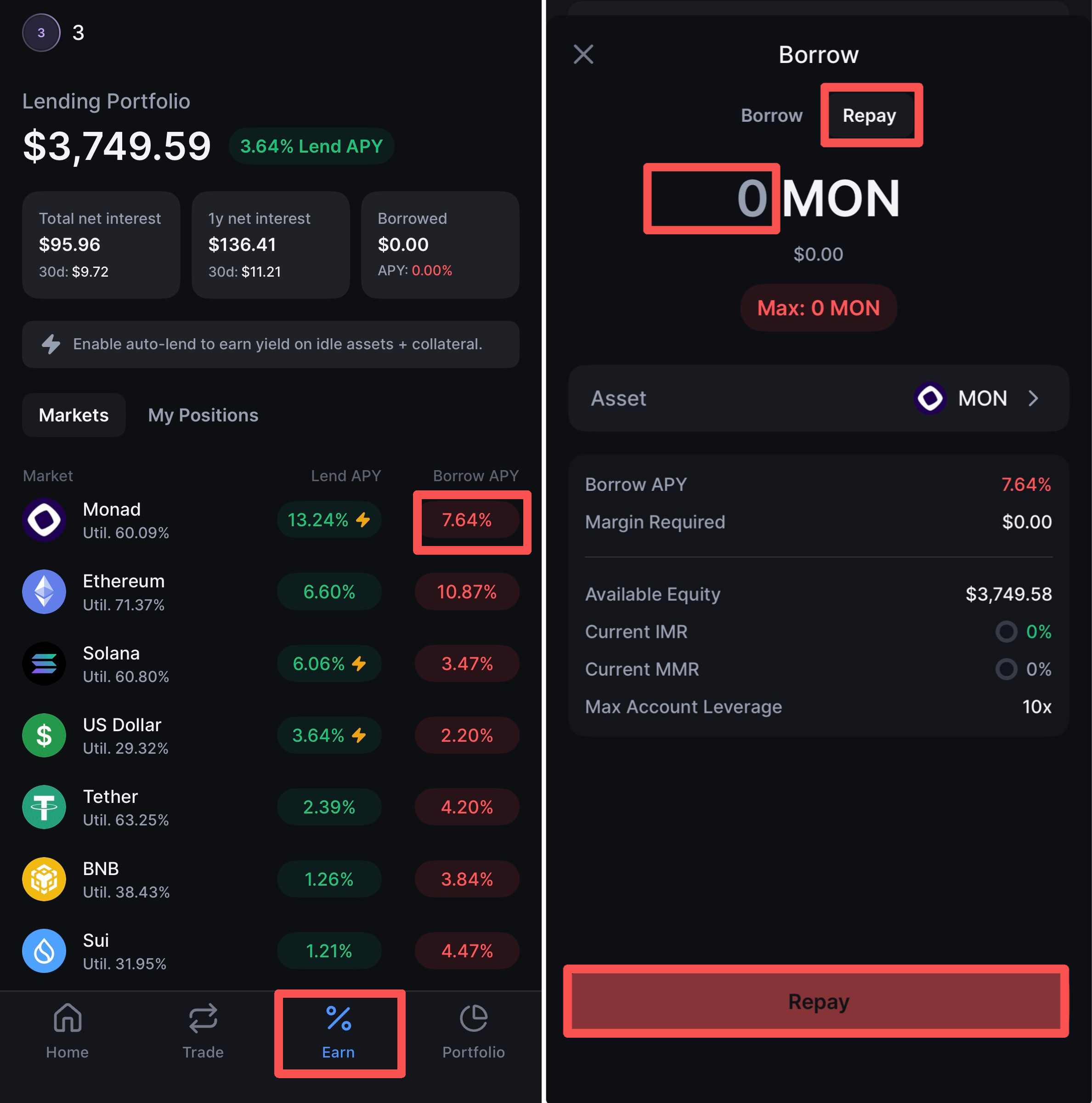
1. Go to the **Earn** page
2. Find the asset you want to repay (e.g. Monad), then tap the rate under **Borrow APY** **(e.g. 7.64%)**
3. **Click** **Repay.**
4. Enter the repayment **amount** and confirm.
***You can also enable Auto Lend, which will automatically use available balances to repay loans when possible.***
Can I withdraw my collateral while I have an open borrow position?
Yes, you can withdraw a portion of your collateral, provided that doing so doesn’t lower your margin level below the required thresholds. If withdrawing collateral would put your account at risk of liquidation, the system will prevent the withdrawal.
Always check your margin level before attempting to withdraw.
Can I opt out of using specific assets as collateral?
On Backpack Exchange, your account operates on a cross-margin basis, meaning **all eligible assets** are used as collateral **by default**. There is no option to disable or opt out of using specific assets as collateral within the same account.
The only way to prevent an asset from being used as collateral is to move it to a sub-account, **isolating** it from your main account’s margin positions.
What happens if the value of my collateral drops while I have an open borrow position?
If the value of your collateral decreases significantly, your margin level will also drop. If it falls below the Maintenance Margin Fraction, your positions will be at risk of **liquidation**.
The system will automatically sell off your collateral to **repay** the borrowed funds.
**To prevent this, monitor your margin level and add more collateral if needed.**
How does the liquidation process work for borrowed funds?
If your **Maintenance Margin Ratio reaches 100%**, the liquidation engine will begin reducing your positions and selling collateral in an orderly manner to cover the borrowed amount. This helps protect both you and the platform.
If your account is liquidated, the engine may sell or convert assets on the order book. A 1% fee is charged for each order-book conversion performed during liquidation
Can I use borrowed funds for trading on Backpack Exchange?
Yes, you can use borrowed funds for both spot and margin trading. This feature provides extra capital to take advantage of market opportunities.
However, using leverage increases your risk, so it’s important to manage your collateral carefully and monitor your margin level to avoid liquidation.
{% hint style="info" %}
### **👉**[**Learn more about** Borrowing](/technical-docs/borrow-and-lend/borrowing.md)
{% endhint %}
---
# Agent Instructions
This documentation is published with GitBook. GitBook is the documentation platform designed so that both humans and AI agents can read, navigate, and reason over technical content effectively. Learn more at gitbook.com.
## Querying This Documentation
If you need additional information that is not directly available in this page, you can query the documentation by asking a question.
Perform an HTTP GET request on the following URL with the `ask` and `goal` query parameters:
```
GET https://support.backpack.exchange/exchange/borrow-and-lend/borrowing.md?ask=&goal=
```
`ask` is the immediate question: it should be specific, self-contained, and written in natural language.
`goal` is what the user is ultimately trying to achieve, the reason they need the answer. Sharing it helps GitBook give you a better, more relevant answer. A goal is most helpful when it describes the outcome the user wants rather than restating the question. For example, with `ask=how do I create an API token`, a goal like `automate deployments from our CI pipeline` lets GitBook tailor the answer to that use case.
The response will contain a direct answer to the question and relevant excerpts and sources from the documentation.
Use this mechanism when the answer is not explicitly present in the current page, you need clarification or additional context, or you want to retrieve related documentation sections.